
 English
 Arabic
 English
 French
 German
What is the Certification Authority? 2026 Update
A Certification Authority (CA) is a trusted organization that issues digital certificates to websites, devices, and individuals. Think of it as a digital passport: it verifies identities and ensures that communications on the internet remain secure. When a CA issues a server certificate or an enterprise certificate authority signs a key, it binds the identity of the entity to a cryptographic key pair, allowing users and systems to trust the connection.
In practical terms, a CA prevents attackers from impersonating websites or intercepting sensitive data. Every time you see the padlock icon in a browser, a publicly trusted CA has verified that the site is authentic.
Cybersecurity professionals rely on understanding what is the certification authority because it forms the foundation of secure networks, certificate services, and identity management in both enterprise and public environments.
TL;DR
- A CA issues certificates that validate the identity of servers, organizations, or individuals.
- It enables encrypted communication, protecting data from interception.
- Certificates issued by CAs can be publicly trusted or internal to an organization (enterprise certificate authority).
How a Certification Authority Works
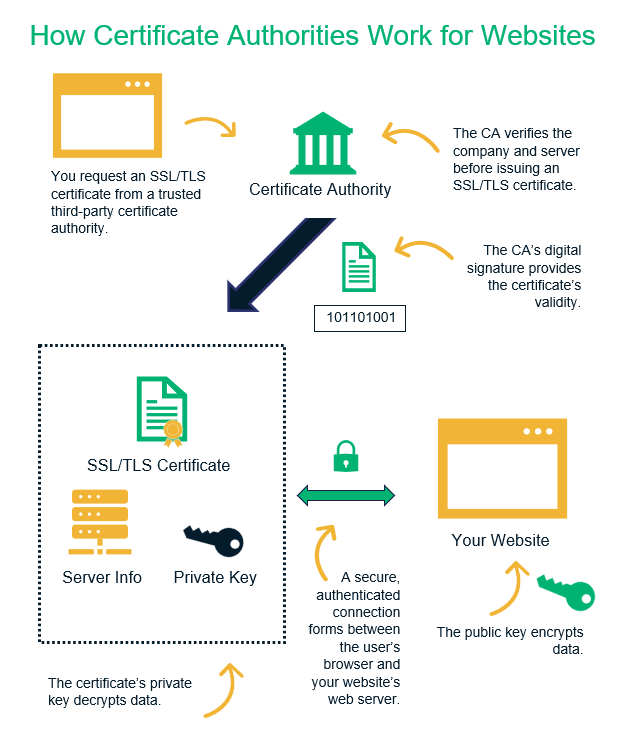
A Certification Authority (CA) operates through a structured process to maintain trust across digital networks. First, the CA verifies the identity of the requester and confirms ownership of the domain or system. This step ensures that no unauthorized entity can obtain a certificate for a domain it does not control.
Once verification succeeds, the CA issues a digitally signed certificate. This certificate links the entity’s identity to a cryptographic key pair, including the authority key and public/private keys. Browsers and devices check the CA’s signature whenever they encounter a server certificate to confirm the site is genuine.
The CA also manages certificate services, including certificate renewal, revocation, and CA certificate download for internal or public trust. Public CAs, known as publicly trusted certificate authorities, maintain their root certificates in major browsers, while enterprise certificate authorities handle internal certificates for organizations.
Step-by-step workflow:
- Verification – Confirm domain ownership or organization identity.
- Issuance – Generate and digitally sign the certificate.
- Distribution – Make the certificate available for browsers, devices, and servers.
- Validation – Systems check the CA signature to trust the connection.
Understanding how a certification authority works is essential for cybersecurity roles, as it forms the backbone of certificate services, encrypted communications, and secure network architecture.
RELATED: What Are Governance Risk and Compliance GRC Certifications?
Types of Certification Authorities
Certification Authorities come in different types, each serving specific needs in cybersecurity. Understanding these types helps organizations and individuals choose the right certificate for their system or network.
1. Publicly Trusted Certification Authorities
Public CAs issue certificates that browsers and devices trust by default. They verify domains and organizations before issuing server certificates, ensuring secure internet communication. Examples include:
- Let’s Encrypt – free, automated certificates widely used on websites.
- DigiCert – enterprise-grade certificates with extended validation.
- GlobalSign – supports large-scale certificate management for companies.
These certification authority companies maintain root certificates in all major browsers, making them universally trusted for HTTPS, email security, and software signing.
2. Private / Enterprise Certificate Authorities
Organizations often deploy their own enterprise certificate authority to manage internal networks, devices, and servers. A central certificate authority or CA domain controller oversees issuance and lifecycle management for the company’s internal systems. These CAs handle:
- Internal server certificates for company intranets.
- Device authentication across networks.
- Employee and system identity verification.
Private CAs allow organizations to control security while avoiding dependency on public CAs for internal communications.
3. Hybrid Models
Some organizations combine public and private CAs. For example, they use a private CA for internal devices and rely on a public CA for customer-facing services. This approach ensures enterprise certificate authority control internally while maintaining publicly trusted validation externally.
Knowing the right CA type helps you implement secure systems efficiently. Use a certification authority list to compare providers, understand their services, and choose between publicly trusted and internal enterprise certificate authorities based on your network needs.
Key Components of a CA Certificate
A CA certificate serves as a digital ID that proves the authenticity of a website, device, or organization. Understanding what is a CA certificate is essential for cybersecurity professionals and IT teams managing secure systems.
1. Public and Private Keys
Every certificate contains a public key and a corresponding private key. The authority key signs the certificate, binding the identity of the entity to its cryptographic key pair. This ensures that data encrypted with the public key can only be decrypted by the matching private key, preventing unauthorized access.
2. Subject Information
Certificates include details about the entity they represent, such as:
- Organization name
- Domain name (CA certificate domain)
- Location and contact information
This information helps users and systems verify that the certificate belongs to the correct entity.
3. Issuer Information
The certificate also identifies the certifying authority that issued it. For public certificates, the issuer is a publicly trusted CA, while for internal certificates, it may be an enterprise certificate authority or central certificate authority managing internal keys.
4. Validity and Expiration
Certificates include start and end dates for validity. Systems check these dates before trusting a certificate, and expired certificates trigger warnings. Cybersecurity teams must track renewal schedules to maintain server certificate trust.
5. Signature and Trust Chain
The signature of the CA confirms that the certificate has not been tampered with. This forms a chain of trust, from the root CA through any intermediate certificates to the end-entity certificate. This chain allows browsers, email clients, and devices to validate connections securely.
Quick Summary:
A CA certificate contains:
- Public/private keys
- Subject details (CA certificate domain)
- Issuer information (certifying authority)
- Validity period
- Digital signature and trust chain
Knowing what is a CA cert and its components is crucial for cybersecurity roles. It ensures proper configuration of certificate services, prevents security breaches, and maintains publicly trusted communication channels.
READ MORE: User Datagram Protocol: 2026 Complete Guide
How to Get a CA Certificate
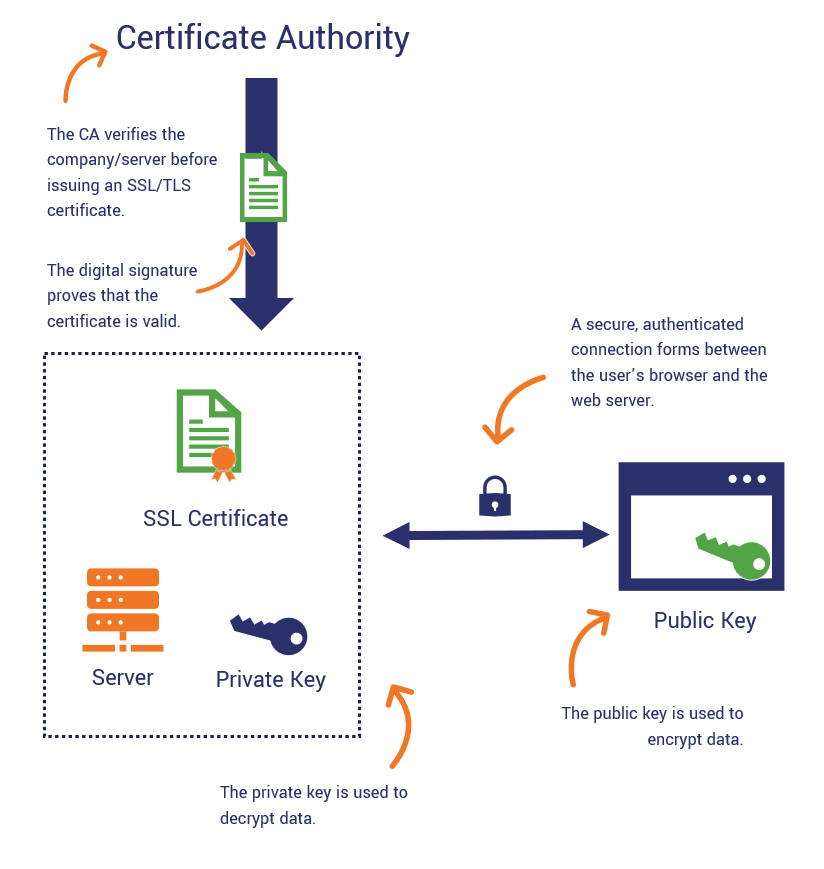
Obtaining a CA certificate starts with understanding whether you need a publicly trusted certificate for external users or an enterprise certificate authority for internal systems. Both types require verification before issuance.
Step 1: Generate a Certificate Signing Request (CSR)
Start by creating a CSR on your server or device. This request includes your CA certificate domain and public key. The private key remains secure on your system.
Step 2: Choose Your Certification Authority
Select a trusted CA from a certification authority list. Popular certification authority companies include:
- Let’s Encrypt
- DigiCert
- GlobalSign
- Sectigo
For internal networks, set up a central certificate authority or use an enterprise certificate authority to issue certificates for devices, servers, and employees.
Step 3: Submit Verification Documents
The CA verifies your identity and domain ownership. For publicly trusted certificates, this may include:
- Domain validation for server certificates (DV certificates)
- Organization validation (OV certificates)
- Extended validation (EV certificates) for maximum trust
For enterprise CAs, internal approval processes replace public verification.
Step 4: Download and Install the Certificate
Once approved, you can download the CA certificate (CA certificate download) and install it on your server, device, or application. This process ensures that browsers and clients recognize your certificate as authentic.
Step 5: Maintain and Renew Your Certificates
Certificates have expiration dates. Monitor your CA certificate validity and renew them promptly to maintain trust. Expired certificates can break secure connections and trigger browser warnings.
List of Trusted Certificate Authorities
Knowing the top CAs helps you choose a publicly trusted certification authority for secure websites, email, and software. A reliable CA ensures your server certificate and communications are trusted by browsers and devices.
Top Trusted CAs
| Rank | Certification Authority Example | Type | Notes |
| 1 | Let’s Encrypt | Public | Free, automated, widely adopted |
| 2 | DigiCert | Public | Enterprise-grade, OV/EV support |
| 3 | GlobalSign | Public | Scalable certificate management |
| 4 | Sectigo | Public | Offers DV, OV, EV certificates |
| 5 | GoDaddy Group | Public | Popular for small-medium business websites |
These organizations appear in lists of trusted certificate authorities maintained by browsers like Chrome, Firefox, and Edge. Browsers trust these CAs because they meet strict audit and compliance standards.
How Many Certification Authorities Are There?
The number of trusted root CAs varies slightly by platform:
- Mozilla Firefox: ~147 root certificates
- Microsoft Windows: ~255 root certificates
- macOS: ~168 root certificates
- Android 4.2+ devices: ~100+ root certificates
This shows that while the certificate authority industry is fragmented globally, a small number of CAs dominate publicly trusted certificate issuance.
Choosing the Right CA
- Check certification authority companies for reliability and industry audits.
- Refer to a certification authority list to ensure the CA is widely recognized.
- Consider the certificate type (DV, OV, EV) based on trust requirements.
SEE ALSO: Secure Shell Protocol: Everything You Need to Know in 2026
Why Certification Authorities Matter in Cybersecurity
A certification authority plays a central role in protecting digital systems. It ensures that data transmitted over networks stays encrypted, preventing attackers from intercepting or tampering with information. Every server certificate issued by a CA confirms that the website, device, or organization is authentic.
Preventing Attacks
CAs stop man-in-the-middle (MITM) attacks and phishing attempts by verifying identities before issuing certificates. When a browser sees a certificate signed by a publicly trusted CA, it knows the connection is legitimate. Cybersecurity professionals rely on understanding what is a CA certificate to defend networks and ensure safe communication.
Supporting Secure Email and Software
Certificate authorities also issue S/MIME email certificates and code signing certificates. This ensures that:
- Emails come from verified senders
- Software and updates have not been tampered with
- Organizations maintain compliance with security policies
Building Trust in Enterprise Networks
Companies use enterprise certificate authorities to manage internal server certificates and device authentication. A central certificate authority ensures that every device and employee in the network can securely communicate without exposing sensitive data.
Understanding the role of a certifying authority is essential for GRC analysts, IT auditors, and security engineers. Mastering CA processes, including certificate services and lifecycle management, equips teams to prevent breaches, maintain compliance, and build trustworthy digital environments.
Common Misconceptions About Certification Authorities
Many people misunderstand what a certification authority does and how trust works in digital communications. Clearing up these misconceptions is essential for cybersecurity professionals.
1. A Certificate Always Means Trust
Some assume that any website with a certificate is automatically safe. In reality, domain validated (DV) certificates only confirm domain ownership, not the organization’s legitimacy. Attackers can still obtain DV certificates for malicious sites. Using organization validated (OV) or extended validation (EV) certificates provides stronger assurance.
2. Public CAs Are the Only Option
While publicly trusted certificate authorities are widely recognized, organizations often deploy enterprise certificate authorities for internal servers and devices. Internal CAs let companies manage trust without relying on public infrastructure.
3. Certificates Never Expire or Need Renewal
Some assume certificates last forcertificates on time.ever. CA certificates have defined lifespans, and expired certificates trigger warnings or block secure connections. Teams must track certificate services and renew
4. All CAs Are Equally Secure
Not all CAs follow the same rigorous audits or standards. Choosing certification authority companies with proper compliance, transparency, and security practices is critical. Weak or compromised CAs can undermine entire networks.
5. CA Compromise Is Impossible
Even trusted CAs can be hacked. Past incidents like VeriSign and DigiNotar breaches show that a compromised CA can issue fraudulent certificates. Understanding this risk helps cybersecurity teams implement monitoring and certificate revocation practices effectively.
Learning the realities behind what is a certification authority ensures cybersecurity teams make informed decisions when issuing, trusting, and managing server certificates and internal enterprise certificate authorities.
MORE: How Multitenant Database Containers Improve Cybersecurity in Modern Enterprise Systems
Best Practices for Using Certification Authorities
Properly managing certification authorities ensures secure networks and reliable communication. Cybersecurity teams must follow best practices to prevent breaches and maintain trust.
1. Choose Trusted CAs
Select publicly trusted certification authorities or verified enterprise certificate authorities. Refer to a certification authority list to confirm the CA’s reputation, compliance, and industry recognition. Avoid unknown providers that may compromise security.
2. Use the Right Certificate Type
Match the certificate to its purpose:
- DV (Domain Validated) – suitable for personal or internal websites.
- OV (Organization Validated) – recommended for businesses.
- EV (Extended Validation) – highest assurance for financial institutions or high-risk transactions.
Using the right type prevents security gaps while maintaining user trust.
3. Manage Certificate Lifecycle
Track issuance, expiration, and certificate revocation. Automate reminders to renew CA certificates and update servers promptly. This prevents unexpected connection warnings and maintains secure communications.
4. Secure Private Keys and Authority Keys
Store private keys and authority keys in hardware security modules (HSMs) whenever possible. Limit access to authorized personnel to prevent compromise.
5. Monitor and Audit Regularly
Regularly review certificate services and logs. Audit internal enterprise certificate authorities to detect unusual activity. Stay compliant with CA/Browser Forum guidelines and industry standards.
6. Educate Teams
Train IT staff and cybersecurity professionals on how to get CA certificates, proper installation, and the risks of expired or mismanaged certificates. Awareness reduces human error and strengthens overall security posture.
Conclusion
Understanding what a certification authority is isn’t just theory; it’s a critical step toward real-world cybersecurity mastery. CAs protect networks, verify identities, and keep sensitive information safe across every server, device, and application. By mastering how server certificates, enterprise CAs, and certificate services work, you gain the foundation to build, audit, and secure digital systems like a professional.
Cybersecurity isn’t just about spotting risks; it’s about taking control, implementing solutions, and protecting the digital world every day. Learning the theory is important, but applying it is what separates observers from skilled practitioners.
Turn Knowledge Into a Cybersecurity Career.
Stop just reading about CAs, start applying your skills to real systems. Schedule a one-on-one session with Tolulope Michael to get a personalized, step-by-step roadmap for launching a high-paying cybersecurity career, even if you have zero prior IT experience.
Reserve your session now and take your first step toward mastering cybersecurity from the ground up.
FAQ
How to Become a Certification Authority?
Becoming a certification authority (CA) requires technical expertise, strict compliance, and industry trust.
You must:
– Set up a public key infrastructure (PKI) with secure certificate services.
– Implement secure key management using hardware security modules (HSMs) for root and intermediate certificates.
– Follow standards like CA/Browser Forum Baseline Requirements and undergo third-party audits (WebTrust or ETSI).
– Distribute root certificates for browser and OS trust if you plan to operate publicly.
Only organizations that meet these technical, legal, and audit requirements can operate as a publicly trusted CA.
Who Can Be a Certifying Authority?
A certifying authority can be:
– Public organizations offering certificates to the general internet (e.g., DigiCert, GlobalSign, Let’s Encrypt).
– Enterprises managing internal certificates for their network (enterprise certificate authority).
– Government bodies issuing digital IDs or certificates for secure communication.
Individuals cannot act as a publicly trusted CA, but organizations with proper infrastructure and compliance can become certifying authorities.
How Many Certificate Authorities Are There?
The total number of trusted certificate authorities depends on the platform:
Mozilla Firefox trusts ~147 root CAs
Microsoft Windows trusts ~255 root CAs
macOS trusts ~168 root CAs
Android devices trust ~100+ root CAs
Globally, hundreds of organizations act as CAs, but only a small number issue the majority of publicly trusted certificates.
How Do I Request a Certificate from a Certificate Authority?
To request a certificate from a CA, follow these steps:
– Generate a Certificate Signing Request (CSR) on your server or device. Include the CA certificate domain and your public key.
– Choose a CA from a trusted certification authority list.
– Submit verification documents according to the certificate type (DV, OV, EV).
– Download the issued certificate (CA certificate download) and install it on your server or device.
– Ensure proper renewal and lifecycle management to maintain trust.
This process applies to both publicly trusted CAs and enterprise certificate authorities.