
 English
 Arabic
 English
 French
 German
Online Phishing Course: Protect Yourself Starting Today
You have probably heard the word phishing before. Maybe your company sent a warning about it. Maybe a friend nearly got scammed. Maybe you clicked something suspicious and your stomach dropped.
Whatever brought you here, this guide covers everything you need. What phishing is, why people fall for it, how to protect yourself, and how to choose the right online phishing course for where you are right now.
No technical background needed.
Table of Contents
What Phishing Actually Is
The Simple Definition
Phishing is when someone pretends to be someone you trust to trick you into giving something away. That something could be your password, your bank details, your personal information, or access to your device.
The word comes from “fishing.” The attacker throws out bait and waits to see who bites.
It is a trick. Nothing more. The attacker is not hacking your device in a Hollywood sense. They are lying to your face through a screen, and hoping you believe them.
Why Phishing Works
Here is the part most people miss: phishing does not target your computer. It targets you.
It works because it triggers emotions that make people act before they think. It does not matter how smart or experienced you are. If the right emotion hits at the right moment, you can fall for it too.
Attackers know this. They study it. They engineer every message to trigger one of six emotions:
Fear. “Your account has been compromised. Act now or lose access.” Fear shuts down careful thinking fast.
Urgency. “You have 24 hours to respond.” Pressure removes your time to question anything.
Authority. “This is the IRS. You owe back taxes.” Messages from authority figures feel harder to challenge.
Curiosity. “Someone shared a photo of you.” You click before you even realize you want to.
Greed. “You have been selected for a $500 gift card.” The reward feels just real enough.
Trust. “Hi, this is Sarah from IT. We need to verify your login.” A familiar name drops your guard instantly.
Once you know these six triggers, you will start to see phishing for what it is: emotional manipulation dressed up as a legitimate message.
How Big Is the Problem?
Phishing is the most common form of cybercrime in the world. Not one of the most common. The most common.
41% of all data breaches involve phishing. Over 3.4 billion phishing emails are sent every single day. The average phishing attack costs an organization $4.9 million in damages. Phishing attempts increased by 61% in one year between 2021 and 2022.
These are not numbers about careless people making bad decisions. Phishing hits individuals, large corporations, governments, and security professionals. The attacks are getting more convincing every year. The good news is that awareness is still the strongest defense available, and it costs nothing.
Every Type of Phishing You Need to Know
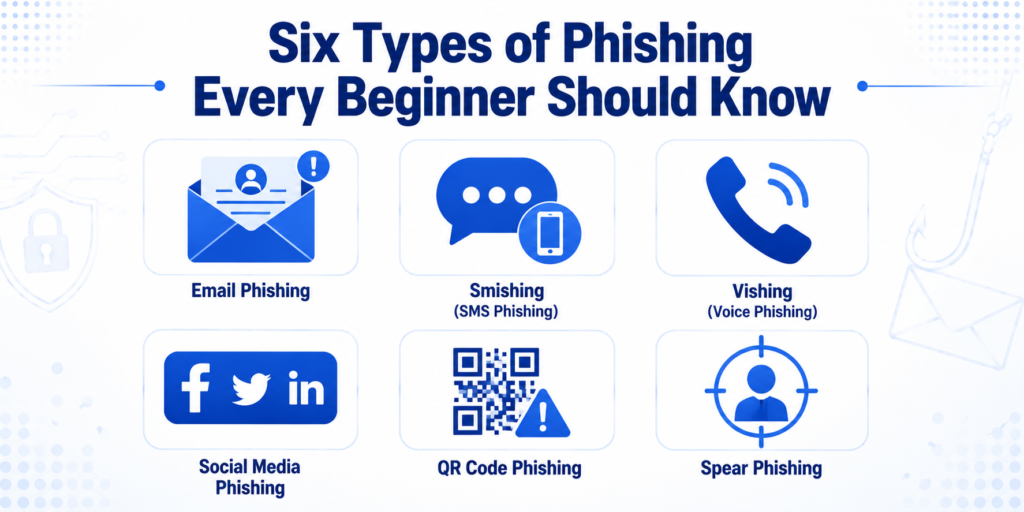
Most people think phishing only happens through email. It does not. Attackers go wherever people are. Here are the types you will actually encounter.
Email Phishing
Email phishing is the original and still the most common. A fake email lands in your inbox pretending to be from your bank, your email provider, a courier company, or a colleague.
The email asks you to click a link, open a file, or reply with information. The link goes to a fake website. The file contains malware. The reply hands the attacker exactly what they wanted.
Real example: You get an email from “Netflix” saying your payment failed and your account will be suspended. You click the link, land on a page that looks identical to Netflix, enter your card details to fix the problem, and give a stranger full access to your payment information. Netflix never sent that email.
Smishing (Text Message Phishing)
Smishing uses text messages instead of email. Your phone feels more personal than your inbox, which is exactly why this type is growing so fast.
A text arrives saying your package could not be delivered. Or your bank account has been locked. Or you have won something. You click the link and the same thing happens as with email phishing.
The danger with smishing is that most people are more suspicious of emails than texts. We have been trained to question emails. Texts still feel safer, and attackers know it.
Vishing (Voice Call Phishing)
Vishing uses phone calls. An attacker calls pretending to be from your bank, a government office, technical support, or even the police. They combine authority and urgency to pressure you into giving information or taking action on the spot.
Some vishing calls now use AI-generated voices that sound completely human. Attackers can even clone the voice of someone you know using a short audio recording.
Real example: A call arrives from someone claiming to be your bank’s fraud team. They say suspicious activity has been detected. They ask you to confirm your account number and PIN for verification. You comply because the call feels urgent and official. The attacker now has everything they need.
Social Media Phishing
Social media is a growing target. Attackers create fake profiles that look like real friends, celebrities, or brand accounts. They send direct messages with links, fake offers, or requests for information.
On WhatsApp, phishing messages spread fast because they come through real contacts, which makes them feel trustworthy. A message from a friend saying “look at this” feels very different from a random email.
On Instagram and Facebook, attackers run fake giveaways, impersonate brand pages, and build fake login pages that steal your credentials when you try to sign in.
The difference with social media phishing is that it exploits people you already trust. When a message appears to come from someone you know, your guard is lower than it would be with a stranger.
QR Code Phishing
QR code phishing is newer and growing fast. Attackers stick fake QR codes in public places like restaurants, parking meters, and notice boards, or send them through email and text. When you scan the code, your phone takes you straight to a malicious website.
QR codes are risky because you cannot see where they lead before you scan. With a link, you can hover your mouse to preview the destination. With a QR code, you only find out after you have already scanned it.
Only scan QR codes from sources you fully trust. If a QR code appears stuck over an existing sticker, especially at a payment terminal or parking meter, do not scan it. It may have been placed there by an attacker.
Spear Phishing
Most phishing is mass-scale. Attackers blast out millions of identical emails and wait for a small percentage to click. Spear phishing is the opposite: a targeted attack built for one specific person.
The attacker researches you first. They check your social media, your LinkedIn profile, your company website. They find your name, your job title, your colleagues, your recent activity. Then they craft a message so personal that questioning it feels unnecessary.
Example: You post on LinkedIn about starting a new job. Two days later, an email arrives from “HR” at your new company asking you to set up your payroll through a link. It has your full name, your start date, and is signed by someone with a real-sounding name. Everything looks right. It is a spear phishing attack.
The best defense against spear phishing is verifying unexpected requests through a separate channel. Call the real organization directly using a number you find yourself, not one given to you in the message.
Why Smart People Fall for Phishing
Recognizing the Trigger in the Moment
Knowing the six emotional triggers intellectually is one thing. Catching them in real time is another.
Here is the practice: when an unexpected message asks you to do something, pause and ask yourself one question. Which emotion is this trying to create in me right now?
If the answer is fear, urgency, authority, curiosity, greed, or trust, slow down. The faster a message wants you to act, the more suspicious it deserves to be. Legitimate organizations give you time. Attackers cannot afford to.
Real Examples of Phishing That Fooled Smart People
In 2016, John Podesta, the chairman of Hillary Clinton’s presidential campaign, fell for a phishing email that appeared to come from Google asking him to reset his password. His account was compromised and his emails were stolen.
In 2019, Toyota lost $37 million when an employee was tricked by a targeted email into changing wire transfer details to an account controlled by attackers.
In 2020, Twitter was compromised when attackers called Twitter employees pretending to be from internal IT and convinced them to hand over access credentials.
These were not careless people. They were experienced professionals at major organizations. Phishing worked because the attacks were well-crafted and emotionally precise.
The One Habit That Stops Most Attacks
Pause before you act.
That single habit stops more phishing attacks than any security software. When a message creates urgency, that urgency is the attack. Take three seconds. Ask yourself: did I expect this?
If the answer is no, verify it through a different channel before doing anything else. Call the bank using the number on the back of your card. Log into your account directly by typing the address yourself. Text your friend separately to ask if they sent you something.
That pause, practiced consistently, stops the majority of phishing attacks cold.
Red Flags Every Beginner Should Know
Red Flags in Emails
The sender address does not match. The display name might say “PayPal Support” but the actual email address is something like “paypal-support@mailserver.xyz.” Click the sender name to reveal the real address.
Generic greetings. Organizations that hold your account know your name. “Dear Customer” or “Dear User” means the sender does not.
Urgent or threatening language. “Act immediately.” “Your account will be suspended.” “You have 24 hours.” Real companies rarely threaten customers this way.
Unexpected attachments. If you did not ask for a file and one arrives unexpectedly, do not open it. This applies even when the sender looks familiar.
Links that go somewhere unexpected. Hover your mouse over any link before clicking. The address shown at the bottom of your screen should match where the link claims to go. If it does not, do not click.
Poor spelling and grammar. Legitimate companies proofread their communications. Awkward phrasing, odd formatting, and spelling mistakes are warning signs.
Red Flags in Text Messages
Unknown sender. A text from a number you do not recognize deserves extra caution.
Shortened links. Links that look like “bit.ly/xxxxx” hide their real destination. Never click a shortened link from someone you do not know.
Requests for personal information. Banks and legitimate companies never ask for your PIN, full password, or account number by text.
Unexpected alerts. “Your package could not be delivered” when you are not expecting anything. “Your account has been flagged” when nothing seems wrong. These are common setups.
Red Flags in Phone Calls
The caller asks for your password or PIN. No legitimate organization will ever ask for this over a call. Ever.
Immediate pressure. “We need to verify this right now or your account closes.” Urgency on a call is a major warning sign.
Unusual requests. “Download this app so we can help you remotely.” “Buy gift cards and read us the codes.” “Transfer your money to a safe account.” These are all known phishing scripts.
The number looks familiar but something feels off. Attackers can fake the number that appears on your screen. A familiar-looking number is not proof of who is actually calling.
Red Flags on Social Media
Unexpected messages with links. Even from people you know. Their account may have been hacked.
Offers that seem too good. Free phones, instant investment returns, prize winnings out of nowhere. If it sounds too good, it is.
Requests for payment or personal details via message. Real brands do not ask for card details or passwords through a DM.
Urgency from “friends.” “I am in trouble. Click this link.” This exact phrasing appears repeatedly in compromised account attacks.
I Clicked a Phishing Link. What Do I Do Right Now?
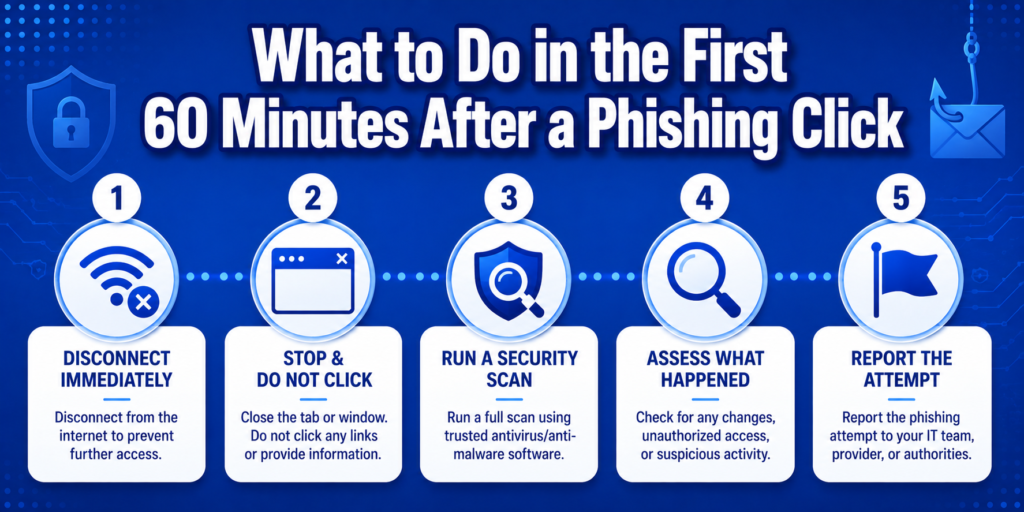
Take a breath. Clicking a link does not automatically mean you are compromised. What matters is what happened after you clicked.
The First 60 Minutes
Step 1: Disconnect from the internet. Turn off your Wi-Fi or unplug your cable. This stops any malware from communicating with the attacker’s servers while you sort things out.
Step 2: Do not touch anything else on the page. If a fake website opened, close the tab. Do not fill in any forms, click any buttons, or download anything.
Step 3: Run a security scan. Use your device’s built-in security tool (Windows Defender works well) or a free option like Malwarebytes to scan immediately.
Step 4: Work out what happened. Did you only click the link? Or did you also enter information? The severity depends on what, if anything, you gave away.
Step 5: Report the attempt. Most email apps have a “Report Phishing” button. Use it. Your report protects other people from the same attack.
If You Entered Your Password
Go directly to the real website by typing the address yourself. Do not use any link from the phishing email. Change your password immediately.
Change your password on every other account that uses the same one. This step is critical. One stolen password becomes many compromised accounts when people reuse them.
Turn on two-factor authentication on the account if it is not already active. Check your recent login activity for any devices or locations you do not recognize.
If You Entered Your Bank Details
Call your bank immediately using the number on the back of your card. Tell them exactly what happened. Ask them to monitor your account and consider freezing your card while you sort things out.
Check your recent transactions. Report anything you do not recognize. If you entered sensitive personal information alongside your bank details, consider placing a fraud alert with the major credit bureaus.
If You Downloaded an Attachment
If you have not opened the file yet, delete it without opening it.
If you already opened it, run a full security scan right away. Some malware takes time to activate, so catching it early matters. Change passwords for your most important accounts as a precaution.
If the device belongs to your employer, contact your IT department immediately. Fast notification gives them the best chance of containing any damage.
Free Tools Every Beginner Should Use Today
You do not need to spend money to protect yourself significantly. These free tools make a real difference.
Password Managers
A password manager creates and stores a unique, complex password for every account you have. If one password is stolen through phishing, your other accounts stay safe because none of them share a password.
Bitwarden is free, open-source, and works across all your devices and browsers. It generates strong passwords, stores them securely, and fills them in automatically so you never have to remember or type them.
Google Password Manager is built into Chrome and Android. If you already use Google’s apps, this is the simplest starting point with no setup required.
Pick one and use it consistently. The habit of unique passwords for every account is the single most effective security measure available to a beginner.
Two-Factor Authentication Apps
Two-factor authentication (2FA) adds a second step when you log in. Even if an attacker has your password, they cannot get into your account without this second step.
Google Authenticator and Microsoft Authenticator are both free. They generate short codes that expire every 30 seconds. Download one and turn on 2FA for your email, banking, and social media accounts first.
Text message codes (where a code is sent to your phone) are better than nothing but can be intercepted. An authenticator app is more secure and just as easy to use.
Browser Extensions That Block Phishing Sites
Netcraft Extension (free for Chrome and Firefox) checks every website you visit against a constantly updated list of known phishing sites. If you land on one, it warns you before you can do anything.
uBlock Origin (free, open-source) blocks malicious ads and scripts that can redirect you to phishing pages. As a bonus, pages load faster without the ads.
These run quietly in the background. You will not notice them unless they catch something.
How to Choose the Right Online Phishing Course
Hundreds of courses exist. Here is how to pick the right one without wasting time.
Free Online Phishing Courses
CISA’s Phishing Resources The US government’s cybersecurity agency offers free materials on recognizing and reporting phishing. Solid foundational content, available globally.
CDSE “Phishing and Social Engineering” A free interactive government course covering email phishing, spear phishing, smishing, and vishing. Open to anyone worldwide.
NoPhish Online Training A free voluntary training program built specifically for beginners. Short, focused, and straightforward.
Cybrary’s Introduction to IT and Cybersecurity Free beginner courses that include phishing as part of a broader cybersecurity foundation. Good if you want phishing awareness alongside other security basics.
Free courses are the right place to start. They cover red flags, phishing types, and what to do if you are targeted. They are not deep enough to build professional skills, but they give you a real foundation.
Paid Online Phishing Courses
Paid courses make sense once you know you want to go further than basic awareness. Udemy courses on phishing typically cost $15-30 and cover both the attack and defense sides. Simply Cyber and TCM Security offer more technical options for $50-200+ for people who want hands-on professional skills.
Invest in a paid course after you have completed at least one free option and confirmed you want to build real cybersecurity knowledge, not just personal protection.
What to Look for in Any Course
Multiple phishing types covered. A strong course covers email, smishing, vishing, social media, and QR code phishing. Not just email.
Psychology included. The best courses explain why phishing works, not just what it looks like. That understanding makes you a far stronger defender.
Hands-on practice. Interactive simulations and real examples beat passive video lectures.
Recent updates. Phishing evolves constantly. Check when the course was last updated before signing up. A 2020 course misses years of new techniques.
A clear start and end point. You should know what level you are starting at and where you will be when you finish. Vague promises are a red flag in courses too.
From Phishing Awareness to Cybersecurity Career
Why Phishing Is the Perfect Starting Point
Most online phishing courses do not mention this: learning phishing is not just about personal protection. It is one of the best starting points for a cybersecurity career.
Phishing connects psychology, technology, and organizational risk in ways that make it useful across many security roles. Security awareness coordinators, compliance teams, GRC (Governance, Risk, Compliance) professionals, and incident response analysts all work with phishing knowledge every day.
And all of those roles are growing globally.
If you started this article just to protect yourself, that is a great reason. But if you finish and want more, you are already at step one of a real career path.
What Comes After Awareness?
What this article teaches is Level 1: recognizing and avoiding phishing attacks.
Level 2 is technical. You learn how attackers actually build campaigns, what tools they use, how defenders detect them, and what security systems protect organizations at scale.
Level 3 is leadership. You design training programs, run phishing simulations, measure behavior change, and report human risk to executives.
Each level makes the one before it make more sense. Each one opens new career options.
The Step Up to Professional Training
If you want to go beyond awareness and build real professional skills, the next step is a phishing course for professionals. It covers technical attack methods, defense tools, organizational program design, career pathways, and global salary data.
EMC Institute’s cybersecurity training programs are built for people who are ready to make that move. You get structured learning, hands-on labs, and career guidance that connects phishing expertise to real roles. Start with the free VSL to see what the program covers and whether it fits where you want to go.
Final Thoughts: Start Here, Go Far
Phishing is not going away. Attacks are getting more convincing. AI is making fake emails harder to spot. QR code scams are spreading. Deepfake voice calls are becoming more common.
But awareness is still the strongest defense. Understanding that phishing is emotional manipulation, not technical wizardry, changes how you respond to suspicious messages. The pause before you act. The habit of verifying. The recognition of the six emotional triggers. These habits protect you better than any software.
Start with a free online phishing course. Use the tools. Build the habits.
When you are ready, go further.
What Are the Four Types of Phishing?
The four most common types of phishing are email phishing, smishing, vishing, and spear phishing. Email phishing uses fake emails pretending to come from trusted organizations like your bank or email provider. Smishing uses text messages with suspicious links or requests for personal information. Vishing uses phone calls where attackers pretend to be from your bank, the government, or technical support. Spear phishing is a targeted attack where the attacker researches you specifically and crafts a personal message using your name, job title, or recent activity to make it feel real. Beyond these four, social media phishing and QR code phishing are growing fast and worth knowing about as well.
Where Can I Find Training on Phishing?
Several good options are available depending on your level and budget. For free training, CISA, CDSE, NoPhish, and Cybrary all offer beginner-friendly phishing courses at no cost. For paid courses with more depth, Udemy offers phishing courses for $15-30 covering both attack and defense perspectives. Simply Cyber and TCM Security offer more advanced technical courses for $50-200+. If you want structured professional training that connects phishing knowledge to a cybersecurity career, EMC Institute’s programs are built specifically for that progression. Start with a free course to build the basics, then invest in structured training when you are ready to go further.
How Much Does Cybersecurity Training Cost in Nigeria?
The cost varies widely depending on the type and depth of training. Free government and university resources cost nothing and cover basic phishing awareness. Individual online courses on platforms like Udemy typically cost ₦15,000-50,000 depending on the current exchange rate and available discounts. Professional certification programs cost ₦200,000-500,000 depending on the provider. Premium structured programs that combine multiple levels of cybersecurity training, including phishing, hands-on labs, and career guidance, can range from ₦500,000 to over ₦1,000,000. The investment tends to pay for itself quickly. Entry-level cybersecurity roles in Nigeria start at ₦3-5M annually, and mid-level professionals with phishing and GRC expertise earn ₦8-15M, making structured training a strong return on investment.
Does Phishing Training Actually Work?
Yes, when done correctly. Research consistently shows that regular phishing awareness training reduces the likelihood of employees clicking phishing links. Organizations that run ongoing phishing simulations alongside training see click rates drop from as high as 30% to under 5% over six months. The key word is ongoing. One-time annual training has limited impact because people forget quickly. Training that is repeated regularly, uses realistic simulated phishing emails, and gives immediate feedback when someone falls for a test produces real, lasting behavior change. The goal is not just finishing a course. It is building the habit of pausing before you click.
Can Learning About Phishing Help Me Start a Cybersecurity Career?
Yes, and it is one of the best starting points available. Phishing sits at the intersection of psychology, technology, and organizational security, which means understanding it well opens doors across multiple cybersecurity roles. Security awareness coordinators, GRC analysts, compliance officers, and incident response professionals all work with phishing knowledge daily. Entry-level cybersecurity roles in Nigeria start at ₦3-5M annually. Globally, mid-level security professionals earn $70,000-$120,000 or more. You do not need to start with the most technical content. Starting with phishing awareness and building progressively toward technical and organizational expertise is a proven path into the field. Many professionals who started with a simple online phishing course are now leading security teams.