
 English
 Arabic
 English
 French
 German
What Is a QR Code? Uses, Risks, and Safety Tips
A QR code (Quick Response code) is a square-shaped barcode that stores information such as a website link, payment details, or contact data. When you scan it with your phone, it instantly opens or triggers that information. That speed is exactly where the name comes from; the “Q” in QR code means quick, and it reflects how fast the code responds.
If you’ve ever wondered what is a QR code picture, it’s simply a visual pattern made of black and white squares. Behind that pattern sits encoded data that your smartphone can read in seconds. Instead of typing a long web address or password, you just scan and move on.
Today, QR codes appear everywhere, restaurants, payment points, event tickets, product packaging, and even job applications. As their use grows, understanding what is a QR code and how it works becomes important, not just for convenience, but for staying safe while using them.

Who Invented QR Code and Why Was It Created?
The QR code was invented in 1994 by DENSO Wave, a Japanese company that operates under the Toyota Group. Engineers needed a faster and more efficient way to track vehicle parts during manufacturing. Traditional barcodes could not store enough information, and workers had to scan them one at a time, which slowed down operations.
To solve this problem, DENSO Wave created a new type of barcode that could store more data and be scanned from any angle. This innovation made it easier to track multiple parts quickly without interrupting workflow. That is why QR codes became widely used in industrial systems before moving into everyday life.
Although QR codes are a form of barcode, they differ from the typical barcode in Japanese manufacturing systems. Regular barcodes store limited data and can only be scanned in one direction. QR codes store much more information and can be read both horizontally and vertically.
Over time, smartphones made QR codes accessible to everyone. What started as a tool for factories is now used for payments, marketing, authentication, and communication across the world.
RELATED: Operation Per Second: Meaning, FLOPS vs IOPS 2026
What Is QR Code and How Does It Work?
To understand what is QR code and how does it work, think of it as a shortcut between the physical and digital world. The black and white pattern you see is not random. It stores encoded data that your phone can read and convert into an action.
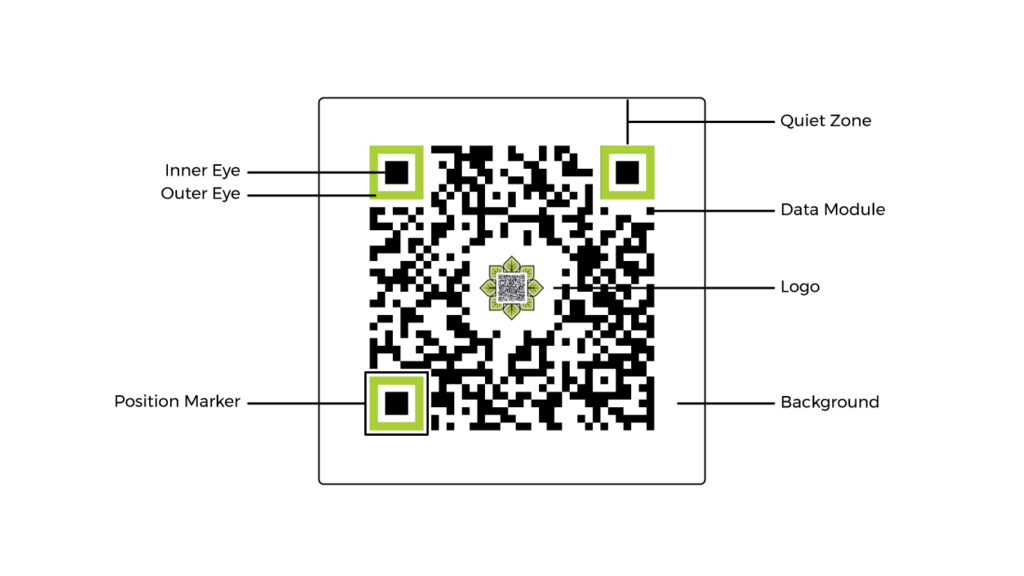
When you scan a QR code example using your smartphone camera, the device detects the square shape and identifies key markers in the corners. It then reads the pattern inside the grid, converts it into binary data, and translates that data into something usable, like a website link, phone number, or file.
Once decoded, the QR code immediately triggers an action. It might open a webpage, start a call, connect you to Wi-Fi, or launch an app. That is why QR codes feel instant. You skip typing and go straight to the result.
A simple QR code sample could store a website URL. When scanned, your phone reads the data and opens the browser automatically. Another example could store contact details, allowing your phone to save a new contact without manual entry.
QR codes also include built-in error correction. This means your phone can still read the code even if part of it is damaged, dirty, or slightly covered. This reliability is one reason QR codes work so well in real-world environments.
In short, QR codes work by encoding information into a visual pattern and letting your device decode and act on it within seconds.
What Is a QR Code Used For? 5 Common Uses
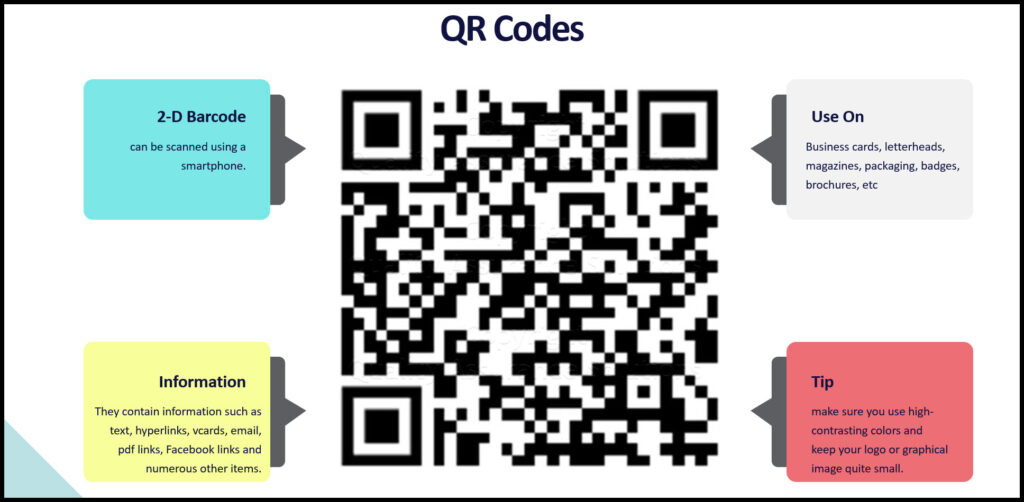
Understanding what is a QR code used for helps you see why it has become part of everyday life. Businesses, schools, and individuals use QR codes to move people from a physical space to a digital action in seconds.
Here are 5 common uses of QR code technology:
1. Opening Websites Instantly
The most common use is linking to a webpage. A simple scan can take users to a product page, sign-up form, or online menu without typing a URL.
2. Contactless Payments
Many businesses now accept payments through QR codes. You scan, confirm the amount, and complete the transaction. This is widely used in stores, restaurants, and peer-to-peer transfers.
3. Wi-Fi Access
QR codes can store network details. With a scan, your device connects automatically. This is where tools like a wifi QR code generator or options to create wifi qr code come in, especially for homes, offices, and public spaces.
4. Calls and Quick Actions
A QR code call feature allows users to scan and instantly dial a number. Businesses use this on flyers, billboards, and websites to reduce friction in customer contact.
5. Tickets, Check-ins, and Authentication
Event organizers and companies use QR codes for tickets, entry passes, and identity checks. This makes check-ins faster and reduces manual verification.
These examples show how QR codes remove steps. Instead of typing, searching, or filling forms, users scan once and act immediately.
READ MORE: Managed Network Services: What Professionals Need to Know in 2026
What Is a QR Code on Android?
If you use an Android device, you’ve likely interacted with QR codes without thinking much about it. So, what is a QR code on Android? It’s the same square code, but your phone acts as the scanner and interpreter.
Most modern Android phones can scan QR codes directly using the camera app or built-in tools like Google Lens. You simply open your camera, point it at the code, and your phone detects it automatically. Once detected, a notification appears, prompting you to open the link, connect to Wi-Fi, or perform another action.
This is exactly how QR codes work on Android. The system reads the pattern, decodes the embedded data, and presents the result in a format you can act on instantly. You don’t need to type anything or install extra apps in most cases.
Android also supports QR codes in more advanced ways. For example, businesses use them for device setup, secure logins, and app downloads. Developers even integrate QR scanning into apps for payments, authentication, and tracking.
In simple terms, on Android, your phone becomes the bridge between the physical QR code and the digital action it triggers.
Are QR Codes Safe? The Cybersecurity Risks You Should Know
QR codes are convenient, but they are not always safe. The code itself is just a pattern, but the real risk comes from where it sends you. This is where cybersecurity becomes important.
Attackers now use QR codes in a tactic known as quishing (QR phishing). Instead of sending suspicious links through email or text, they hide those links inside QR codes. When you scan the code, your device may open a malicious website without warning.
Here are the most common risks:
Fake Login Pages
A QR code can redirect you to a page that looks real, such as a bank or email login. Once you enter your details, attackers capture your credentials.
Malicious Payment Redirects
In public places, attackers can replace legitimate payment QR codes with their own. You think you’re paying a business, but the money goes elsewhere.
Harmful Downloads
Some QR codes trigger downloads that install unwanted or harmful software on your device.
Tampered Physical Codes
It is easy to print and paste a fake QR code over a real one. This happens in restaurants, parking spots, and public posters.
Untrusted Wi-Fi Access
Scanning a Wi-Fi QR code can connect your phone to an unsafe network, exposing your data to interception.
The key thing to remember is this: QR codes remove visibility. You cannot see the destination before scanning, which makes it easier for attackers to trick users.
That is why understanding what is a QR code is no longer just about convenience. It is also about knowing when to trust what you scan.
SEE ALSO: What is a TCP/IP Protocol? Networking Importance in 2026
How to Scan QR Codes Safely
QR codes are easy to use, but you need to scan them with caution. A few simple habits can protect you from most QR-related threats.
1. Check the Source First
Only scan QR codes from places you trust. Be careful with codes on random posters, public walls, or unknown websites. If something feels off, skip it.
2. Preview the Link
Many phones show a preview before opening the link. Take a second to read it. If the URL looks strange or unrelated, do not proceed.
3. Avoid Entering Sensitive Information
Never enter passwords, banking details, or personal data after scanning an unknown QR code. Legitimate services rarely ask for sensitive information through random scans.
4. Be Careful with Payments
Before making any payment, confirm that the QR code belongs to the right person or business. Always double-check the name or account details.
5. Use Trusted Scanning Tools
Stick to your phone’s built-in camera or trusted apps. Avoid downloading random QR scanner apps that could expose your data.
6. Think Before Connecting to Wi-Fi
If you scan a code to connect to Wi-Fi, make sure it is from a trusted source. Public or unknown networks can expose your activity.
7. Watch for Tampered Codes
Look closely at printed QR codes. If you see stickers placed over another code or anything that looks altered, do not scan it.
These steps take only a few seconds but can prevent serious issues. QR codes are powerful tools, but your awareness is what keeps you safe.
Final Thoughts…
A QR code is a square barcode that stores information you can access instantly by scanning it with your phone. It can open a website, make a payment, connect you to Wi-Fi, or trigger other actions without typing anything.
The Q in QR code means “Quick,” which reflects how fast it works. You scan once, and your device takes you directly to the result.
Understanding what is a QR code is no longer just about convenience. QR codes now power payments, logins, and everyday interactions. That also means they can be misused if you scan the wrong one.
The safest way to use QR codes is simple: Scan trusted sources, check where the link leads, and avoid entering sensitive information after scanning.
QR codes make life faster. Awareness makes them safe.
Ready to move beyond just understanding cybersecurity and start building a real career in it?
Join the ExcelMindCyber Institute’s 90-day program and gain hands-on experience working on real-world scenarios like risk management, threat analysis, and security operations. This isn’t just theory. You learn practical skills that companies actually pay for, with guidance from experts who have done it themselves.
If you’re serious about transitioning into cybersecurity and landing high-paying roles in GRC or security operations, this is where you begin. Don’t just learn cybersecurity. Build a career that pays you for it.
FAQ
What qualifies as earned income?
Earned income refers to money you receive from active work or services. This includes salaries, wages, bonuses, tips, and income from self-employment or freelance work. If you are trading your time or skills for money, it is generally considered earned income.
What qualifies as unearned income?
Unearned income is money you receive without actively working for it. Common examples include dividends from investments, rental income, interest from savings, pensions, and capital gains. This type of income usually comes from assets rather than labor.
What types of income are not considered earned income?
Income that is not considered earned typically includes:
– Investment returns (dividends and capital gains)
– Rental income
– Inheritance or gifts
– Pension or retirement distributions
– Interest from bank accounts
These are classified as unearned because they do not require ongoing active effort to generate.
What is the difference between earned income and unearned income?
The main difference lies in how the income is generated. Earned income comes from working or providing a service, while unearned income comes from assets or investments. Earned income usually requires continuous effort, whereas unearned income can continue even when you are not actively working.