
 English
 Arabic
 English
 French
 German
Secure Shell Protocol: Everything You Need to Know in 2026
The Secure Shell protocol (SSH) protects your network by encrypting communication between computers. Cybersecurity professionals use it to access servers remotely, transfer files securely, and create encrypted tunnels. Unlike outdated protocols like Telnet, SSH prevents eavesdropping, tampering, and unauthorized access.
Understanding how SSH works step by step is crucial for anyone managing servers, cloud systems, or sensitive networks. Mastering SSH ensures your shell security is strong, your keys are safe, and your connections remain private, even over unsecured networks.
What Is the Secure Shell Protocol?
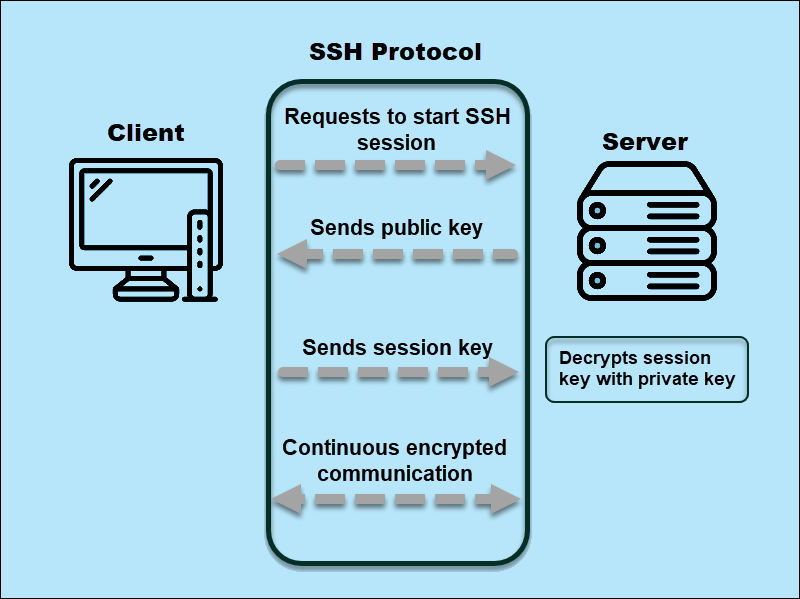
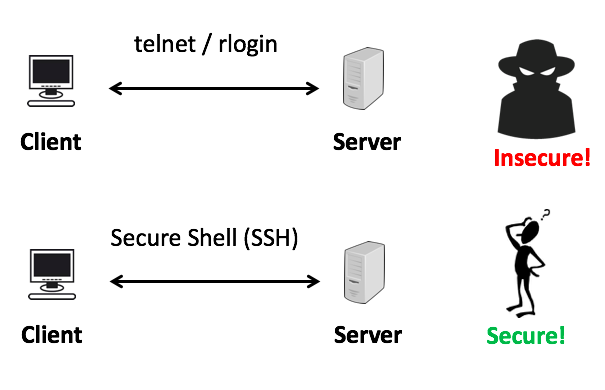
The Secure Shell protocol (SSH) is a cryptographic network protocol that lets you control remote systems and transfer files securely. You use it to log into servers, manage infrastructure, and tunnel network traffic without exposing sensitive data. Unlike Telnet or rlogin, which send information in plain text, SSH encrypts every command and file. On Linux systems, you can check whether SSH is running with commands like what is ssh in Linux. Each SSH session relies on a network key for authentication, ensuring that only authorized users can access the server.
RELATED: How Multitenant Database Containers Improve Cybersecurity in Modern Enterprise Systems
How SSH Works Step by Step
The SSH protocol secures remote connections by combining encryption, authentication, and channel management. Follow these steps to understand how SSH works step by step:
- Establish a Secure Transport Layer: Your client initiates a TCP connection (usually on port 22) to the SSH server. This layer negotiates encryption algorithms and confirms the server’s identity using a network key.
- Authenticate the User: SSH verifies who you are. You can log in using a password or a cryptographic key pair with commands like ssh -i [private-key]. This ensures that only authorized users gain access.
- Create Logical Channels: Once authenticated, SSH opens multiple secure channels over the same connection. These channels allow you to execute commands, transfer files, or forward ports simultaneously.
- Encrypt Data in Transit: Every command, response, and file moves through the tunnel encrypted, preventing eavesdropping or tampering.
- Maintain Session Integrity: SSH ensures data integrity with cryptographic checks. Any alteration in transit triggers an error, protecting your shell security.
By following these steps, SSH guarantees that your remote operations remain private, authenticated, and secure, whether you use Linux, macOS, or Windows clients.
Understanding SSH Ports and Network Keys
Every SSH connection relies on the correct SSH port and secure authentication keys. By default, SSH uses port 22, but administrators can configure SSH using port alternatives to improve security. You can verify the SSH default port with commands like what port is ssh or check server configurations to see the port of SSH in use.
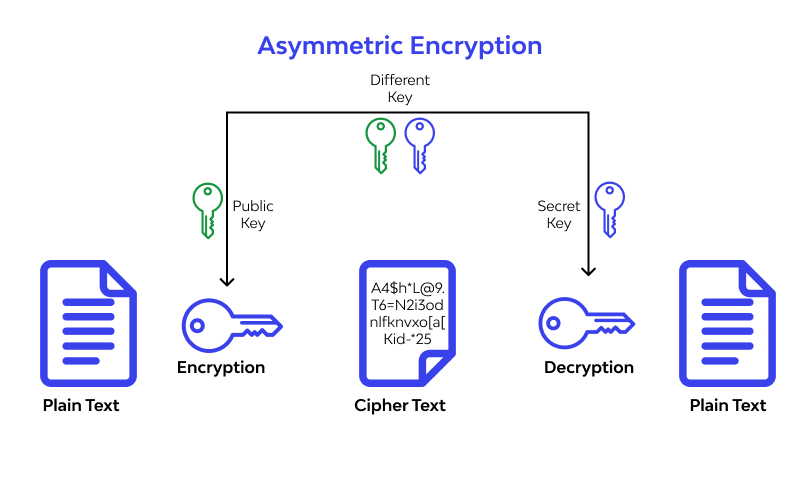
SSH always requires a network key for authentication. The key pair ensures the client and server verify each other before exchanging commands or transferring files. Whether you’re connecting from Linux, macOS, or Windows, managing keys correctly protects your secure shell port from unauthorized access.
Remember, SSH typically runs over TCP (SSH protocol TCP or UDP) because TCP guarantees reliable delivery, which is essential for encrypted communications.
Practical Uses of SSH in Cybersecurity
Cybersecurity professionals rely on SSH, secure shell, to protect and manage networks actively. Here’s how they use it:
- Remote Server Administration: You log into servers securely, execute commands, and manage infrastructure without exposing credentials. SSH ensures each session is encrypted, safeguarding shell security.
- Secure File Transfers: You transfer sensitive files between systems using SFTP or SCP. By leveraging SSH tunnels, files move without interception, making ssh protocol critical for data integrity.
- Port Forwarding and Tunneling: SSH allows you to create encrypted tunnels, redirecting traffic from one network port to another. You can configure SSH with port forwarding to access internal resources securely, even through firewalls.
- Cross-Platform Management: From Linux (what is SSH in Linux) to Windows (using shellhost.exe), SSH commands like ssh -i [key] let you authenticate efficiently across multiple operating systems.
By applying these techniques, IT teams securely control networks, protect data, and enforce access policies without exposing systems to attackers.
READ MORE: Can You Learn Cybersecurity on Your Own (2026)
Common SSH Commands Every Cybersecurity Professional Should Know
Mastering SSH commands is essential for maintaining shell security and managing remote systems efficiently. Here are the most important commands:
- Connect to a Server:
ssh username@hostname_or_ip
Use this to start a secure session over the SSH default port (usually port 22).
- Connect Using a Private Key:
ssh -i /path/to/private_key username@hostname
This method strengthens authentication and avoids passwords.
- Secure File Copy:
scp file.txt username@hostname:/destination/path
Transfer files safely between systems.
- SSH Key Management:
- Generate keys: ssh-keygen
- Copy keys to servers: ssh-copy-id username@hostname
- Check SSH Port Number:
ssh -p [port_number] username@hostname
This lets you connect if the server uses a custom SSH port instead of port 22.
- Advanced Tunneling:
- Local port forwarding: ssh -L local_port:remote_host:remote_port username@hostname
- Remote port forwarding: ssh -R remote_port:local_host:local_port username@hostname
These commands give you full control over remote servers, port forwarding, and key-based authentication, ensuring every connection is secure.
SEE ALSO: Management System Compliance: CMS Update for 2026
Security Best Practices and Risks
Even the SSH secure shell can become vulnerable if misconfigured. Cybersecurity professionals actively follow these best practices to protect networks:
- Use Non-Default Ports: Avoid using port 22 publicly. Configuring SSH using port alternatives reduces automated attacks targeting the default SSH port number.
- Manage Keys Properly: Always rotate and revoke network keys when personnel change. Weak or stale keys create a risk for attackers to compromise your secure shell port.
- Enable Strong Authentication: Prefer key-based login (ssh -i) over passwords. Combine it with multi-factor authentication when possible.
- Monitor Access Logs: Track SSH login attempts and unusual activity to detect unauthorized access. Tools like shellhost.exe on Windows or Linux auditing can help maintain shell security.
- Limit User Privileges: Avoid granting root access unless necessary. Active permission management prevents accidental or malicious system changes.
- Stay Updated: Use the latest SSH protocol version (SSH2) and apply patches to fix vulnerabilities like key exposure or tunnel attacks.
By implementing these steps, you secure your SSH connections, protect sensitive data, and reduce the risk of breaches on any network.
Conclusion
The Secure Shell protocol (SSH) remains the backbone of secure remote administration. By understanding how SSH works, managing network keys, and configuring the SSH port properly, you control servers safely, transfer files securely, and create encrypted tunnels. Always follow best practices: use strong authentication, avoid default port 22, monitor access logs, and rotate keys regularly.
Whether you connect from Linux (what is ssh in Linux), macOS, or Windows (shellhost.exe), mastering SSH secure shell commands like ssh -i and configuring SSH with port forwarding ensures your shell security stays uncompromised. Start applying these techniques today to protect your network and maintain control over your systems.
Turn your knowledge into a career. Join ExcelMindCyber’s 90-day program to gain hands-on GRC and cybersecurity skills, build real-world experience, and get job-ready for high-paying roles.
FAQ
Why is SSH better than Telnet?
SSH encrypts all data exchanged between client and server, protecting passwords, commands, and files from interception. Telnet, by contrast, sends information in plain text, leaving it vulnerable to eavesdropping. By using encryption and strong authentication, SSH ensures secure shell connections even over untrusted networks.
Is SSH a VPN?
No, SSH is not a VPN. While SSH can create encrypted tunnels and forward ports, it only secures individual connections or services. A VPN encrypts all network traffic from a device and provides broader network-level protection, whereas SSH is focused on secure remote access and command execution.
What are the types of SSH?
There are two main versions: SSH-1 and SSH-2. SSH-1 is outdated and considered insecure. SSH-2 is the current standard, offering stronger encryption, improved integrity checks, and better support for key-based authentication. Most modern systems and tools exclusively use SSH-2.
What is the most common SSH username?
The most common username for SSH access is root on Linux/Unix systems. However, best practice is to avoid direct root login and use a regular user account with sudo privileges to reduce security risks.