
 English
 Arabic
 English
 French
 German
GRC Tools: The Insider Guide to Getting Hired Fast
Most articles about GRC tools are written for organizations shopping for software. This one is not.
This guide is for GRC professionals and career changers who want to know which tools actually matter, which ones show up in job postings, and which ones to learn first to move their career forward.
No vendor bias. No sales pitch. Just straight answers.
Table of Contents
What Are GRC Tools? (Plain English)
A GRC tool is software that helps organizations manage governance, risk, and compliance in one place.
Without it, GRC work is scattered. Policies live in Word documents. Risks sit in spreadsheets. Compliance deadlines get tracked in email threads. Things get missed. Audits become painful.
A GRC tool pulls everything into one system. Policies connect to risks. Risks connect to controls. Controls connect to compliance evidence. When an auditor asks for proof, the tool produces it fast.
Think of it as the backbone of a GRC program.
What They Actually Do
Every GRC tool, regardless of price or brand, does the same four things:
It stores and manages policies. It tracks risks and the controls designed to reduce them. It monitors compliance against frameworks like SOC 2, ISO 27001, or GDPR. And it generates reports for auditors, leadership, and regulators.
What separates tools from each other is how well they do these things, how much they automate, how many frameworks they support, and what they cost.
Why Organizations Use Them
Compliance without a tool is expensive and slow.
Organizations that manage compliance manually spend an average of 11 weeks per year on compliance tasks alone. Collecting evidence for one SOC 2 audit can take months when done manually. GRC tools cut that time by automating evidence collection, alerting teams when controls slip out of compliance, and mapping one finding to multiple frameworks at once.
That last point matters. If one control satisfies SOC 2, ISO 27001, and PCI DSS at the same time, a GRC tool shows you that overlap so you are not doing the same work three times.
59% of organizations now list automating security and compliance tasks as a top strategic priority. Tools are how that happens.
Why GRC Professionals Need to Know Them
Here is the career reality: GRC tools appear in nearly every mid-level and senior GRC job posting.
“Experience with ServiceNow GRC.” “Familiarity with Vanta or Drata.” “Hands-on RSA Archer experience.” These phrases appear constantly in job descriptions for GRC Specialist, GRC Manager, and Compliance Manager roles.
Candidates who know these tools get interviews. Candidates who do not get filtered out before a hiring manager reads a single line of their resume.
Tool knowledge is no longer optional. It is part of what the job requires.
The Four Core Functions Every GRC Tool Covers
Before looking at specific platforms, understand what every GRC tool is built to do. These four functions appear whether the tool is a free beginner option or an enterprise platform costing six figures.
Policy and Governance Management
GRC tools store policies, track versions, and distribute them across the organization. They record when each policy was last reviewed, who approved it, and which employees have read and acknowledged it.
In a manual system, a policy sits in a shared folder and nobody knows if it is still current. In a GRC tool, every policy has a review date, an owner, and a full audit trail. When a regulatory update requires a policy change, the tool flags it and tracks every step of the update process.
Risk Assessment and Monitoring
GRC tools build and maintain risk registers. Professionals use them to record identified risks, rate likelihood and impact, assign owners, link risks to controls, and track mitigation over time.
More advanced platforms add continuous monitoring. Instead of quarterly risk reviews, the tool watches configurations and controls in real time. When something changes in a way that raises risk, the team gets an alert immediately.
Compliance Tracking and Audit Management
This is where GRC tools save the most time.
Instead of manually gathering evidence for every compliance requirement, the tool connects to your existing systems (cloud providers, HR platforms, code repositories) and pulls the evidence automatically.
When an auditor asks for proof of a control, a GRC tool can produce a complete evidence package in minutes instead of weeks.
Reporting and Dashboards
GRC tools generate reports for different audiences. Operations teams see which controls need attention. Executives see overall compliance posture across multiple frameworks with a simple summary view. Auditors get a structured evidence package.
Professionals who can configure these dashboards and interpret the data are valuable on any GRC team.
The GRC Tools That Actually Appear in Job Postings
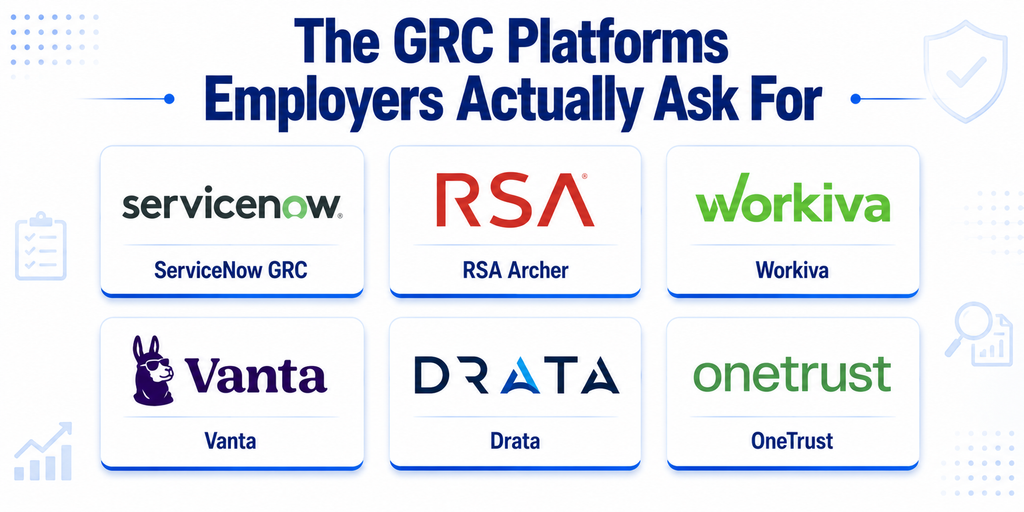
These are the platforms that show up most often in real GRC Specialist and GRC Manager job descriptions. Learning even one of them puts you ahead of most candidates at the same level.
ServiceNow GRC
ServiceNow is the most recognized name in enterprise GRC. Its GRC module sits inside the broader ServiceNow platform, which many large organizations already use for IT operations.
ServiceNow GRC covers policy management, risk assessment, compliance monitoring, and audit management. Because so many organizations already run ServiceNow for other functions, GRC professionals who know it fit into existing environments without extra onboarding.
It appears in more senior GRC job postings than any other tool. If you are targeting large enterprise roles, this is the platform to understand first.
Best for: Large enterprises, senior GRC Specialists, GRC Managers. Cost: Typically 50,000-200,000+ annually depending on modules and users.
RSA Archer
RSA Archer is one of the oldest GRC platforms on the market. It is deep, highly customizable, and widely used in financial services, healthcare, and government.
Archer handles risk management, compliance, vendor risk, policy management, and audit management. It is powerful but not easy. Organizations that use it typically have large, dedicated GRC teams to manage it.
If you want to work in financial services or a heavily regulated industry, knowing RSA Archer is a clear advantage.
Best for: Financial services, healthcare, government, experienced GRC professionals. Cost: Typically 30,000-150,000+ annually.
Workiva
Workiva is different from most GRC tools. It specializes in connecting GRC with financial reporting and sustainability management.
Organizations use Workiva to manage SOC 2 compliance, internal audit programs, and ESG (environmental, social, and governance) reporting. It is particularly strong on documentation, evidence management, and audit trail creation.
Workiva shows up frequently in job postings for compliance roles at publicly traded companies and organizations with significant reporting requirements.
Best for: Compliance professionals, internal audit teams, ESG reporting. Cost: Enterprise pricing, varies by module and organization size.
Vanta
Vanta is one of the fastest-growing GRC platforms, especially popular with technology companies going through their first SOC 2 or ISO 27001 certification.
What sets Vanta apart is automation depth. It connects directly to cloud providers (AWS, Azure, GCP), code repositories (GitHub, GitLab), and HR systems to collect compliance evidence automatically rather than waiting for manual uploads.
Vanta is increasingly common in job postings at technology companies and scale-ups. It is also one of the more accessible platforms for professionals who want to build hands-on experience.
Best for: Technology companies, startups, SOC 2 and ISO 27001 programs, mid-level GRC Specialists. Cost: Starts around 7,500-15,000 annually for smaller organizations.
Drata
Drata is Vanta’s closest competitor. It takes the same automation-first approach but with stronger risk management depth and out-of-the-box support for a wider range of compliance frameworks including SOC 2, ISO 27001, HIPAA, GDPR, PCI DSS, and CMMC 2.0.
Drata is growing fast in job postings at technology companies managing multiple frameworks at the same time.
Best for: Multi-framework compliance, technology companies, complex GRC programs. Cost: Similar to Vanta, starting around 7,500-15,000 annually.
OneTrust
OneTrust is the leading platform for privacy and data governance. It handles GDPR compliance, consent management, privacy impact assessments, data mapping, and data subject request workflows.
As privacy regulations expand globally (GDPR in Europe, NDPA in Nigeria, POPIA in South Africa, CCPA in California), OneTrust expertise is growing in value well beyond Europe.
OneTrust appears regularly in job postings for privacy-focused GRC roles, Data Protection Officer positions, and compliance roles at organizations managing significant consumer data globally.
Best for: Privacy compliance, GDPR, Data Protection Officers, global consumer data. Cost: Enterprise pricing, varies significantly by module.
How GRC Tools Connect to Major Frameworks
Knowing a tool is not enough. Understanding how it connects to the frameworks driving compliance work is what makes a GRC professional genuinely useful.
SOC 2 and GRC Tools
SOC 2 covers five Trust Services Criteria: security, availability, processing integrity, confidentiality, and privacy. Evidence collection for SOC 2 is ongoing and detailed.
Vanta and Drata were both built with SOC 2 in mind. They automate evidence collection, track control effectiveness continuously, and generate audit-ready packages when auditors need them. Managing a SOC 2 program without one of these tools means doing manually what the tool handles automatically.
ISO 27001 and GRC Tools
ISO 27001 is the international standard for information security management. It requires implementing and maintaining an Information Security Management System (ISMS) covering 93 controls across four domains.
ServiceNow GRC, Drata, and Vanta all support ISO 27001. They map the standard’s controls to the organization’s existing security measures, identify gaps, track remediation, and maintain the continuous monitoring ISO 27001 requires.
GRC Specialist professionals who can manage an ISO 27001 program inside a platform like ServiceNow command higher salaries than those working only from spreadsheets.
NIST and GRC Tools
The NIST Cybersecurity Framework (CSF) and NIST SP 800-53 are widely used across US government, defense contracting, and organizations working with federal agencies.
ServiceNow GRC and RSA Archer both have strong NIST support. They map NIST controls to organizational security measures, track implementation, and generate reports that demonstrate compliance to auditors and regulators.
If you are targeting government contracting or CMMC 2.0 compliance roles, ServiceNow GRC or RSA Archer should be on your learning list.
GDPR and GRC Tools
GDPR compliance means mapping personal data flows, managing consent, tracking data subject requests, and proving appropriate controls protect personal data. That complexity makes manual management nearly impossible at scale.
OneTrust is the dominant platform for GDPR work. It handles data mapping, consent management, privacy impact assessments, and data subject request workflows in one place.
As African data protection regulations strengthen alongside GDPR (Nigeria’s NDPA, South Africa’s POPIA, Kenya’s Data Protection Act), professionals who understand privacy compliance and can operate tools like OneTrust are valuable not just in Europe but globally.
Free and Affordable GRC Tools for Beginners
Enterprise GRC platforms are expensive. As an individual learner or early-career professional, you cannot afford them. But you can still build real GRC tool skills without spending a cent.
Spreadsheet-Based GRC
The honest starting point: most small and medium-sized organizations still manage significant portions of their GRC programs in Excel or Google Sheets.
A well-structured GRC spreadsheet includes a risk register, a controls inventory, a policy tracker, and an evidence tracker. Building these from scratch teaches you the underlying logic of GRC programs before you ever open a software platform.
If you cannot build a risk register in a spreadsheet, you will not fully understand what a GRC tool is automating when you use one. Start here.
Free Templates and Frameworks
NIST’s Cybersecurity Framework resources include free templates, implementation guides, and control mappings used by professionals worldwide. Working through them builds real framework knowledge that transfers directly to any GRC tool.
ISACA (the organization behind CISA and CISM certifications) publishes free GRC guidance and templates for members. Membership is affordable and the resources are professional-grade.
OCEG publishes the GRC Capability Model, the foundational standard for GRC program design. Understanding this model helps you evaluate any GRC tool against what a well-designed program actually needs.
Platforms With Free Access
Vanta and Drata both offer demo access and free trial periods. Working through a demo account shows you how a modern automated GRC platform works, what evidence collection looks like, and how controls map to frameworks.
Even without a full account, both platforms publish detailed documentation and tutorial videos. Spending time in these gives you enough familiarity to discuss them confidently in a job interview.
Which GRC Tool Should You Learn First?
The answer depends on your career level, your industry, and what job postings in your target role actually require.
Based on Your Career Level
Entry-level (0-3 years): Build a risk register, controls inventory, and policy tracker in a spreadsheet first. Then work through NIST CSF free resources to understand framework mapping. This foundation makes every GRC tool easier to pick up.
Mid-level (3-7 years): Match your learning to where you already work. Technology company? Learn Vanta or Drata. Large enterprise? Learn ServiceNow GRC. Financial services? Learn RSA Archer.
Senior level (7+ years): You need to evaluate, select, and implement GRC tools, not just use them. Understand at least three platforms well enough to compare them and make a recommendation based on organizational needs.
Based on Your Industry
Technology/SaaS: Vanta or Drata (SOC 2 and ISO 27001 focused) Financial Services: RSA Archer or ServiceNow GRC (complex risk, heavy regulation) Healthcare: ServiceNow GRC or Workiva (HIPAA, audit trails) Government/Defense: ServiceNow GRC (NIST, CMMC 2.0) Privacy/Data Protection: OneTrust (GDPR, global privacy) General Enterprise: ServiceNow GRC (most widely deployed)
Based on Job Postings
This is the most reliable method. Find ten GRC Specialist or GRC Manager job postings in your target industry and location. Write down every tool mentioned across all ten. The one that appears most is the one to learn first.
If ServiceNow appears in seven of ten, that is your answer. If Vanta appears in six because you are targeting technology companies, that is your answer. Let the job market decide.
How GRC Tool Knowledge Advances Your Career
Tool knowledge is not just a resume checkbox. It changes what you can do, how fast you can do it, and what organizations will pay you.
What Job Postings Say
Mid-level GRC Specialist postings increasingly list tool experience as a required skill, not a nice-to-have. Candidates without it are screened out before a hiring manager sees their name. Organizations want people who can open the platform and be useful in week one.
How Tools Affect Salary
GRC professionals with platform-specific expertise earn more than those without it.
In the United States, GRC Specialists with ServiceNow GRC experience earn 15-25% more than peers without it, based on industry compensation data. RSA Archer expertise commands similar premiums in financial services.
The difference is not just knowledge. It is proof. A GRC Specialist who can say “I configured ServiceNow GRC to automate our SOC 2 evidence collection and reduced audit preparation time by 40%” is a different candidate from one who says “I am familiar with GRC tools.”
Specific beats general. Every time.
From Tool User to GRC Leader
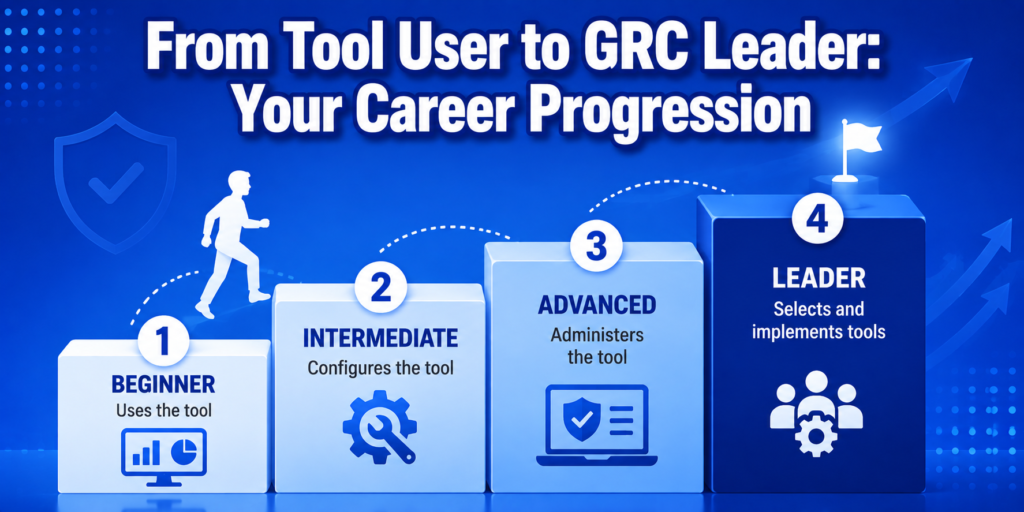
GRC tool expertise grows in clear stages.
Beginner: You complete assigned tasks inside the tool (update a risk register, upload evidence, pull a report).
Intermediate: You configure the tool (set up workflows, build dashboards, customize control mappings for your organization’s frameworks).
Advanced: You administer the tool (manage users, build integrations, optimize the platform for your compliance program).
Leader: You evaluate, select, and implement GRC tools for organizations. You make the business case for platform investments. You design GRC programs that use tools strategically.
Each stage commands higher compensation and more influence. The GRC Roadmap from analyst to specialist to manager follows this exact progression, with tool expertise as one of the clearest differentiators at every level.
If you are working toward a GRC Analyst role or already in one, platform knowledge is one of the fastest ways to make the case for advancement.
If you want structured training that builds both GRC framework knowledge and practical program skills, EMC Institute’s cybersecurity programs include the hands-on foundations that make learning GRC tools faster. You understand what a tool automates because you have already built the underlying processes yourself. Explore what the program covers and see how it connects to the career path you are building.
Final Thoughts: Tools Are Skills, Not Just Software
GRC tools are not the destination. They are how you get there faster.
The goal is a GRC program that protects the organization, keeps it compliant, and gives leadership clear visibility into risk. Tools make that program work at scale.
But they also make you more hireable, more effective, and more promotable.
Start with spreadsheets. Build the fundamentals. Then learn the platform most relevant to where you want to work. Back it up with specific examples of what you built and what changed because of it.
Framework knowledge plus tool expertise plus proven results is what the best GRC Specialist and GRC Manager candidates bring to every interview.
The market rewards that combination. Go build it.
What Is an Example of a GRC Tool?
ServiceNow GRC is one of the most widely used examples. It helps organizations manage policies, track risks, monitor compliance across frameworks like SOC 2 and ISO 27001, and generate audit reports all in one platform. Other strong examples include RSA Archer, which is popular in financial services and government, Vanta and Drata, which are built for technology companies automating SOC 2 and ISO 27001 compliance, OneTrust for privacy and GDPR compliance, and Workiva for organizations connecting GRC with financial and ESG reporting. Each tool serves a slightly different need, but all of them centralize governance, risk, and compliance work that would otherwise be scattered across spreadsheets and email threads.
Which GRC Tool Is Best?
There is no single best GRC tool. The right one depends on your industry, organization size, and the frameworks you need to manage. For large enterprises, ServiceNow GRC is the most widely deployed and the most recognized in job postings. For technology companies managing SOC 2 or ISO 27001, Vanta and Drata lead because of their automation depth and cloud integrations. For financial services and heavily regulated industries, RSA Archer is the strongest option. For privacy and GDPR compliance, OneTrust is the dominant platform. The best approach is to identify which tool appears most in job postings for your target role and industry, then focus your learning there.
Is Jira a GRC Tool?
Jira is not a GRC tool by design. It is a project management platform built primarily for software development teams to track tasks, bugs, and sprints. However, some organizations adapt Jira to support GRC activities like tracking remediation tasks, managing audit findings, and monitoring compliance project timelines. It can work as a lightweight supplement to a GRC program but it lacks the core features that dedicated GRC platforms provide, such as risk registers, policy management, framework mapping, automated evidence collection, and compliance dashboards. If your organization uses Jira for GRC-adjacent tasks, it is worth knowing, but it should not replace a purpose-built GRC tool in a mature compliance program.
What Are GRC Tools in Cybersecurity?
In cybersecurity, GRC tools are platforms that help security teams manage governance, risk, and compliance in one structured system. Governance features handle security policies, procedures, and accountability frameworks. Risk management features help teams identify, assess, prioritize, and track cybersecurity risks. Compliance features monitor whether the organization meets the requirements of frameworks like NIST CSF, ISO 27001, SOC 2, HIPAA, PCI DSS, and GDPR. In practice, cybersecurity GRC tools connect to cloud environments, security systems, and HR platforms to collect compliance evidence automatically, flag control failures in real time, and produce audit-ready reports. They allow security teams to move from reactive compliance work to continuous, proactive risk management.
How Do GRC Tools Help With Career Advancement?
GRC tool knowledge directly impacts hiring decisions and salary negotiations. Mid-level and senior GRC job postings increasingly list specific platforms like ServiceNow GRC, RSA Archer, Vanta, and Drata as required skills rather than optional ones. Candidates without hands-on tool experience are often screened out before a hiring manager reviews their resume. In the United States, GRC Specialists with ServiceNow GRC experience earn 15-25% more than peers without it. The key is not just knowing a tool exists but being able to show what you built with it. A candidate who says “I configured Vanta to automate our SOC 2 evidence collection and cut audit preparation time by 40%” stands out significantly from one who says they are familiar with GRC platforms. Tool expertise, combined with framework knowledge and proven results, is what moves GRC professionals from mid-level to senior roles.