
 English
 Arabic
 English
 French
 German
Footprinting Vs Fingerprinting in Cybersecurity: Complete 2026 Guide
Footprinting Vs Fingerprinting in Cybersecurity: Complete 2026 Guide
Cyberattacks almost never begin with hacking; they begin with information gathering. Before an attacker sends a single exploit or payload, they spend time learning everything they can about a target: what systems exist, which services are exposed, and where the weakest point might be. In cybersecurity, this phase is called reconnaissance, and two techniques dominate it: footprinting and fingerprinting.
Footprinting vs fingerprinting in cybersecurity describes the difference between discovering what exists and discovering the exact technical details behind it. Footprinting collects publicly accessible information, domain names, IP addresses, employee emails, cloud exposures without interacting directly with the target.
Fingerprinting goes deeper. It involves active probing (like port scanning or banner grabbing) to identify the operating system, open ports, service versions, and network configuration.
Understanding these two reconnaissance techniques equips cybersecurity analysts, penetration testers, and security leaders to spot attacks before they escalate. It also helps organizations minimize what they unknowingly expose online.
In this guide, you’ll learn the difference between footprinting and fingerprinting, the tools used for each, when they’re applied, and how organizations can defend against them. By the end, you’ll understand how attackers collect information, and how to reduce your attack surface before they ever reach your network.

Start a Life-Changing Career in Cybersecurity Today
Footprinting Vs Fingerprinting: Quick Comparison Table
Cybersecurity professionals use both techniques during reconnaissance, but their intent and execution differ. The table below summarizes how they compare in approach, interaction level, data depth, and risk.
| Aspect | Footprinting | Fingerprinting |
| Approach | Passive (indirect information gathering) | Active (direct probing of the target) |
| Interaction With Target | No interaction required; relies on publicly available data | Requires interaction; sends requests to target systems |
| Primary Goal | Identify the target’s digital footprint and potential entry points | Identify technical details such as OS, services, and software versions |
| Information Revealed | IP ranges, domain names, employee emails, exposed subdomains | Open ports, OS version, running services, network configuration |
| Common Methods | Search engines, WHOIS lookup, OSINT tools | Banner grabbing, port scanning, TCP/IP stack analysis |
| Tools Used | Google Dorks, WHOIS/RDAP, Shodan (passive), Maltego | Nmap, Netcat, Curl, Wappalyzer |
| Risk of Detection | Low — target is unaware | Medium to high — may trigger security alerts |
| When It’s Used | First — maps what exists (initial reconnaissance) | Second — determines vulnerabilities and actionable weakness. |
| Who Uses It | Attackers, ethical hackers, security analysts | Pen testers, red teams, threat actors, SOC analysts for validation |
What Is Footprinting in Cybersecurity?
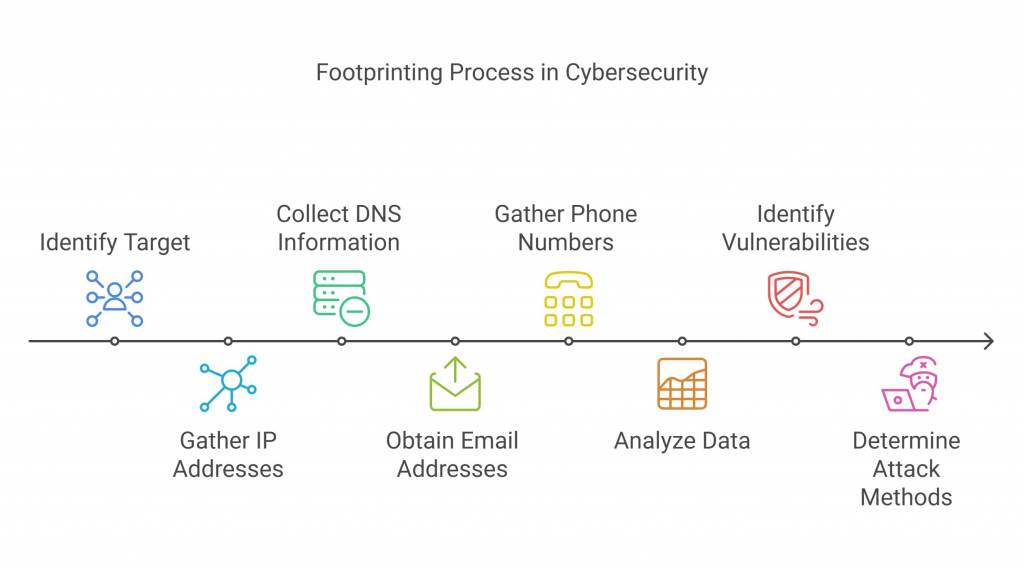
Footprinting is the first phase of reconnaissance where an analyst collects publicly accessible information about a target without interacting with its systems. The goal is simple: create a complete picture of the organization’s digital presence, domains, subdomains, IP blocks, cloud assets, exposed emails, third-party vendors, and tech stack indicators.
In cybersecurity, footprinting is often called passive reconnaissance because it relies on open-source intelligence (OSINT). Nothing is sent to the target network, so there is no digital “noise,” making this phase difficult to detect. Both ethical hackers and attackers use footprinting to map the attack surface and identify where to probe deeper.
What Footprinting Reveals
Footprinting helps uncover:
- Company domain names and associated subdomains
- Public IP ranges and cloud hosting providers
- Employee names, email addresses, and job roles
- Technology stack indicators (what software a company openly mentions using)
This early-stage mapping guides decisions on where fingerprinting should happen next.
Passive vs. Active Footprinting
| Type | Description | Example Activities |
| Passive Footprinting | Does not interact with the target; zero detection risk. | Google search operators, WHOIS lookup, LinkedIn scraping. |
| Active Footprinting | Indirect interaction with target infrastructure; low-level probing. | DNS queries, subdomain enumeration, certificate lookups. |
Tools Used in Footprinting
Common OSINT and reconnaissance tools include:
- Google Hacking Database/Google Dorks — reveal misconfigurations or exposed documents
- WHOIS/RDAP Lookup — shows ownership and contact info of domains
- Shodan/Censys — scans the internet for exposed systems and ports
- theHarvester/Amass/Subfinder — collect emails, subdomains, and DNS info
Footprinting answers one key question: What is visible to the internet that attackers can potentially exploit?
RELATED: Application Security vs Cybersecurity: A 2025 Complete Guide
What Is Fingerprinting in Cybersecurity?
Fingerprinting is the second phase of reconnaissance, where an analyst interacts directly with a target to collect specific technical details. Unlike footprinting (which gathers publicly available data), fingerprinting sends requests to the system and analyzes the responses. It focuses on uncovering how the system works internally, not just what exists.
Fingerprinting is considered active reconnaissance because it involves probing the target, scanning open ports, identifying running services, or analyzing network protocol responses. This makes fingerprinting more likely to trigger intrusion detection systems (IDS), rate limits, or firewall logs.
What Fingerprinting Reveals
Fingerprinting provides technical intelligence that attackers and penetration testers use to select the right exploit:
- Operating system (Windows Server, Linux, Ubuntu, etc.)
- Service versions (Apache 2.4.51, NGINX 1.18.0, etc.)
- Open ports and running services (SSH, FTP, SMTP, RDP, etc.)
- Web application technologies (PHP, React, Node.js)
- Server misconfigurations or outdated software
This turns general target knowledge into actionable vulnerability mapping.
Types of Fingerprinting
| Type | What It Uncovers | Typical Use |
| Network Fingerprinting | Ports, network devices, protocol behavior | Mapping the network surface |
| OS Fingerprinting | Operating system type and version | Choosing compatible exploit payloads |
| Application Fingerprinting | Web frameworks, databases, CMS details | Identifying vulnerabilities in web apps |
Tools Used in Fingerprinting
Some widely used tools and techniques include:
- Nmap — Port scanning, OS detection, service version identification
Example: nmap -O -sV target.com
- Netcat / Telnet / Curl — Banner grabbing (reveals software versions)
- Wappalyzer / BuiltWith — Identify CMS, frameworks, plugins, ad stacks
- Traceroute / Ping / Packet analyzers — Network path and latency analysis
Fingerprinting converts recon data into system-level intelligence.
When to Use Footprinting vs Fingerprinting
Use footprinting first, always. It’s low-risk, fast, and reveals the scope of what exists online, the domains, IP ranges, cloud hosts, and third-party services you’ll need to consider. Start broadly: collect OSINT, enumerate subdomains, and build an asset list. This gives you a “map” so your active tests don’t wander aimlessly or waste time.
Move to fingerprinting only after you have a scoped list of targets and explicit permission (for assessments). Fingerprinting turns your map into a plan: it verifies which hosts respond, what services run, and which versions are exposed. That detail determines whether an exploit is feasible and which proof-of-concept to test. Because fingerprinting generates noise, you should control cadence, throttle requests, and use stealthy flags where possible.
Practical sequence (recommended):
- Passive OSINT: Google dorks, WHOIS, certificate transparency, public cloud footprints.
- Low-risk active enumeration: passive Shodan/Censys queries, DNS lookups, certificate scans.
- Targeted fingerprinting: Nmap service/version scans, banner grabs, protocol probes — confined to scoped IPs.
- Validation: non-destructive checks (version checks, CVE mapping) before any exploit attempts.
Risk decision matrix:
- No authorization + public IPs = only passive footprinting.
- Written authorization + scoped engagement = full fingerprinting.
- Incident response (live breach) = time-boxed probes with blue-team coordination.
Following this flow preserves safety, reduces false positives, and keeps your recon defensible and actionable.
SEE MORE: What Is Third-Party Vendor Risk Management (TPRM)? Complete Guide
Legal, Ethical, and Governance Considerations
Reconnaissance sits at the intersection of technical discovery and legal risk. Footprinting may look harmless because it uses public data, but fingerprinting, which touches target systems, can quickly cross legal and ethical lines. Follow these rules to keep assessments defensible and your organization out of trouble.
1. Always get written authorization.
Penetration tests and any active fingerprinting require a signed Rules of Engagement (RoE) or testing agreement that explicitly lists:
- Scope (IP ranges, domains, apps)
- Allowed activities and tools (e.g., Nmap flags, web fuzzing)
- Time windows and throttling limits
- Exclusions (production payment systems, medical devices, critical infrastructure)
- Point(s) of contact and emergency procedures
2. Define evidence & reporting standards.
Agree how findings are documented (screenshots, logs, packet captures) and stored. Preserve chain-of-custody metadata (timestamps, tool outputs, hashes) so reports are auditable and non-repudiable.
3. Minimise handling of sensitive data.
Avoid exfiltrating PII or business-critical data. If a test uncovers sensitive information, stop and notify the designated contact immediately. Use redaction in reports and follow data-protection rules applicable to the organization (GDPR, Nigeria’s NDPR, CCPA, etc.) when transmitting results.
4. Respect third-party assets and supply chains.
Testing that touches partners, cloud providers, or vendor systems needs explicit consent from those owners. Unauthorised probing of third-party infrastructure exposes you to contractual and legal liabilities.
5. Use a disclosure policy and coordinate fixes.
Establish a vulnerability disclosure process: timeline for remediation, retest windows, and responsible public disclosure rules. If testing uncovers an exploitable vulnerability, coordinate fixes before public release.
6. Log, monitor, and communicate.
Notify the SOC/blue team in advance (or set agreed “silence windows”) and ensure monitoring is active during tests to prevent misinterpreting scans as real attacks. Keep legal counsel in the loop for high-risk tests or cross-border engagements.
Quick RoE Checklist (must-have items):
- Signed agreement + authorized signatory
- Exact IP/domain scope with exclusions
- Permitted tool list & request rates
- Data handling & retention policy
- Emergency contact & incident escalation path
- Liability, indemnity, and non-disclosure clauses
Adhering to these governance practices keeps reconnaissance ethical, legal, and valuable, turning potentially risky probing into a controlled, actionable security exercise.
READ: What Is Blockchain Security? A Comprehensive Breakdown
How to Defend Against Footprinting & Fingerprinting (Blue-Team Measures)
Defence begins before probes occur: reduce the amount of public information attackers can collect, then make any active probing noisy, costly, or meaningless. Below are practical, prioritized controls defenders can implement to shrink the signal attackers rely on and to detect or frustrate active scans.
Reduce What Attackers Can Find (limit footprint value)
Start with data hygiene and inventory control. Remove unnecessary public-facing metadata (file/document EXIF, forgotten S3 buckets, developer staging sites), lock down WHOIS contact details with privacy protection, and enforce a policy for sanitizing public documents. Maintain an authoritative asset inventory and map cloud services and third-party exposures so you know what should be visible versus what’s accidental.
Harden Service Exposure & Surface Management
Minimize exposed services: close unused ports, disable legacy protocols, and block management interfaces from the public internet with VPN or jump hosts. Implement strict DNS and certificate hygiene, monitor certificate transparency logs (crt.sh), and use short-lived certificates where possible. Use an automated Attack Surface Management (ASM) tool or scheduled Shodan/Censys scans to continually discover unexpected assets.
Mask and Normalize Banners (frustrate fingerprinting)
Remove or normalize service banners and version strings across web servers and network services to deny easy version identification. Configure servers to return generic error messages and disable verbose server headers. For APIs and web apps, standardize HTTP headers and rate-limit unusual patterns to blunt fingerprinting accuracy.
Detect & Rate-Limit Active Probes
Instrument detection points: enable IDS/IPS, WAF rules, and flow-based alerts tuned for port-scan signatures and unusual TCP/IP flag combinations. Use threshold-based rate limiting and progressive blocking for unusual connection patterns (multiple ports, repeated banner grabs). Integrate honeypots or deception assets to identify reconnaissance early — traffic to hidden endpoints is a high-confidence indicator of scanning.
Network Controls & Egress Filtering
Implement strict ingress/egress rules and disable unnecessary ICMP/TCP options that reveal OS behavior. Enforce microsegmentation so a compromised or probed host cannot easily reveal internal topology. Egress filtering prevents internal systems from being used as reconnaissance pivot points and reduces the value of detected assets.
Operational Practices: Patch, Inventory, and Test
Keep software and firmware patched with a prioritized cadence tied to exposure (public-facing services faster). Conduct routine authenticated scanning and scheduled pentests under RoE to validate controls, not to prove absence but to measure detection and response. Use BAS (Breach and Attack Simulation) tools to simulate recon workflows and validate alerting and rate-limit controls.
Logging, Triage, and Playbooks
Centralize logs from perimeter devices, WAFs, endpoint agents, and authentication systems. Create a triage playbook for recon detections: validate whether the activity is authorized, identify target assets, escalate to the RoE contact if it’s a test, or to incident response if it’s unauthorized. Retain forensic captures (pcap, banners, timelines) for investigation and legal needs.
People & Policy: Security by Design
Train developers and marketing teams on OSINT risks: teach secure publishing (no credentials in repos, sanitized PDFs), and require security review before content or infrastructure goes public. Include reconnaissance reduction in vendor onboarding: require vendors to prove responsible disclosure policies and limit supply-chain exposure.
Quick Blue-Team Checklist
- Remove PII from public assets and sanitize metadata
- Enforce WHOIS privacy and certificate monitoring
- Close unused ports; block management interfaces from public internet
- Normalize/strip service banners and limit verbose error messages
- Deploy IDS/WAF with scan-detection rules and rate limits
- Run ASM/continuous Shodan checks and scheduled pentests under RoE
- Log centrally and maintain a recon-detection playbook
Implementing these measures turns reconnaissance from a low-cost, low-risk activity for attackers into an expensive, detectable sequence, shifting the advantage toward defenders.
SEE: Comptia Security+ vs Google Cybersecurity Certification: 2025 Comparison
Mini Case Studies
Case Study A — Pen Test Flow: From Footprinting to Fix
Context: A mid-size ed-tech provider engaged a red team for a 2-week assessment of public-facing infrastructure.
Step 1: Passive Footprinting:
The tester used OSINT to map domains, public cloud buckets, and employee profiles. They discovered forgotten staging subdomains indexed in search engines and an exposed S3 bucket holding CSV exports with internal hostnames.
Step 2: Target Selection & Scoping:
Using the asset list, they scoped three public hosts for active testing (explicitly covered in the RoE). Low-risk checks first: certificate transparency queries and passive Shodan lookups confirmed exposed services.
Step 3: Fingerprinting:
On scoped hosts, the tester ran targeted Nmap scans (-sV –version-all) and performed banner grabs. Results: an outdated Apache version and an exposed admin endpoint responding with verbose server headers.
Step 4: Vulnerability Mapping & Validation:
The tester correlated the Apache version with a public CVE and validated a safe, non-destructive proof (no exploit executed) to demonstrate exploitability.
Outcome & Fixes:
Report included prioritized remediation: remove staging DNS entries, lock S3 ACLs, mask server banners, and patch the web server. After remediation, a short recheck verified fixes. The engagement improved the organization’s ASM cadence and introduced automated cert monitoring.
Lesson: Start passive, scope tightly, and validate findings non-destructively to keep tests safe and actionable.
Case Study B — Blue-Team Response: Detecting & Thwarting Recon
Context: A financial services firm observed unusual scanning activity in web logs.
Detection:
WAF alerts flagged repeated requests across multiple ports and accesses to a hidden admin path. Honeypot telemetry captured banner-grab attempts and rapid port probes consistent with fingerprinting tools.
Triage & Response:
SOC triaged using a recon playbook: verified source IPs, correlated Shodan history, and contacted the vendor RoE contact to rule out authorized testing. When no RoE matched, SOC applied progressive blocking and fed indicators to SIEM for correlation.
Containment & Investigation:
Egress filters and rate limits were tightened, the targeted host was moved behind an additional proxy layer, and packet captures were retained for forensic analysis. Logs showed the attacker’s fingerprinting stopped after being blocked, but not before they enumerated a deprecated API endpoint.
Remediation & Hardening:
Immediate fixes included stripping server banners, disabling the deprecated API, enforcing WAF rules for common fingerprinting signatures, and initiating a vendor review of exposed third-party services.
Lesson: Early detection plus deception (honeypots) converts reconnaissance into a high-confidence alert, enabling quick containment and reducing the attacker’s window.
Common Mistakes to Avoid
Many organizations understand reconnaissance conceptually, but overlook simple missteps that make them easy targets. Avoid these pitfalls if you want to reduce how much attackers can learn from you before ever touching your network.
Mistake #1: Assuming public information is harmless
Teams often believe that “it’s just a PDF online” or “our subdomain isn’t linked anywhere.”
Attackers see something different: employee names → email formats → phishing targets. Public documents often contain hidden metadata (author names, email accounts, internal hostnames).
Mistake #2: Treating footprinting and fingerprinting as the same
Footprinting is what exists.
Fingerprinting is how to exploit it.
Confusing these results in poor prioritization and wasted scan cycles, or excessive noise that alerts attackers or overwhelms compliance logs.
Mistake #3: Running fingerprinting without formal approval
Active probing without authorization can:
- Violate Terms of Service
- Trigger intrusion detection and auto-blocking
- Create legal exposure under cybersecurity laws
Always have a signed Rules of Engagement (RoE) before running active scans.
Mistake #4: Leaving banners and version headers exposed
Server or API banners like:
Apache 2.4.49 (Ubuntu)
…tell attackers exactly which CVEs to test.
Mask or normalize banners to return generic values like:
“Server: Secure”
Mistake #5: Relying only on firewalls and ignoring OSINT
Firewalls protect what’s inside.
OSINT exposes what’s outside, and once something is indexed on search engines, Cloudflare can’t help you.
Reduce what’s public, not just what’s reachable.
Mistake #6: No inventory of what is actually exposed
Attackers shouldn’t know about your exposed assets before you do.
If you don’t know what lives on the public internet…
You can’t protect it.
Conclusion
Footprinting and fingerprinting are critical parts of cybersecurity reconnaissance, and understanding the difference between them helps organizations defend more strategically. Footprinting maps what exists: domains, subdomains, public-facing cloud assets, and employee exposure.
Fingerprinting then probes deeper to uncover service versions, open ports, and exploitable configurations. Together, they explain how attackers turn a simple Google search into a targeted security breach.
The strongest defense is proactive: reduce what the world can see, monitor for active probing, and continuously validate your exposure. Organizations that inventory assets, scrub public data, mask server banners, patch quickly, and review third-party exposure dramatically reduce their attack surface. The earlier recon is detected, the faster risk can be contained.
If you’re serious about strengthening your cybersecurity skills and breaking into high-income cyber roles, there’s a direct path:
FAQ
What’s the difference between a digital footprint and a fingerprint?
A digital footprint is the trail of data someone leaves behind online, social media posts, website logins, email subscriptions, and even search history. It represents user-generated activity.
A digital fingerprint, on the other hand, is data collected about a user or system automatically, such as browser type, device characteristics, IP address, or operating system. It represents system-generated identifiers that websites or attackers use to track or profile a device.
Digital footprint = what you intentionally leave online.
Digital fingerprint = what your device reveals automatically.
What are the 5 C’s of cybersecurity?
The 5 C’s of cybersecurity are key pillars used by security teams and compliance frameworks:
Change — Monitoring changes in systems, code, or configuration.
Compliance — Adhering to policies, regulations, and industry standards.
Cost — Balancing security investments with business impact.
Continuity — Ensuring business operations continue during attacks or failures.
Coverage — Ensuring security controls protect all assets, not just core systems.
These five elements guide strategic decision-making and help organizations build scalable, risk-aware security programs.
Can you make $500,000 a year in cybersecurity?
Yes, it’s possible, but it usually requires combining cybersecurity skills with leadership, specialization, or entrepreneurship. Professionals who hit $500,000+ annually often fall into one of these categories:
– Cybersecurity consultants with high-value corporate clients
– GRC or cybersecurity program managers leading enterprise security
– Cybersecurity startup founders or course creators
– Senior penetration testers who take on private engagements
Many start with technical roles, transition into GRC (governance, risk, and compliance), consulting, or leadership, then scale income by managing bigger outcomes and risk decisions.
What are the fingerprint types 3?
In cybersecurity, fingerprinting can be grouped into three main categories:
– Network Fingerprinting — Identifies open ports, protocols, and services.
– OS Fingerprinting — Determines the operating system and version based on packet response behavior.
– Application Fingerprinting — Determines web technologies, frameworks, CMS, plugins, and server type.
These fingerprint types help attackers and penetration testers uncover vulnerabilities and decide which exploits apply.